Email tools for early-stage startups: what to run from pre-revenue to your first customers
By Mara Levin · Updated October 7, 2026 · Prices and docs checked that day
The right tool is the one whose free tier outlasts your waitlist and whose first paid step you can price today. For SaaS products that will bill through Stripe, Paddle or Lemon Squeezy, that is Sequenzy (free 2,500 emails a month, then $19 for 15,000, unlimited contacts). Loops fits while you have under 1,000 contacts and want a polished editor, and Resend (free 3,000 emails, Pro $20 for 50,000) fits when engineers own email.
The short answer
- Billing is coming and one account should do everything: Sequenzy, because it counts emails rather than contacts and ties flows to billing events.
- A non-developer will write the onboarding emails: Loops while you stay under 1,000 contacts, then read its slider.
- Your engineers own email and most of it is transactional: Resend, or Postmark if delivery of a few critical messages is the promise.
- You are collecting a waitlist or newsletter audience first: MailerLite up to a few thousand subscribers, Kit if the audience is large and sequences can wait.
- You raised under $10M and have a growth person: Customer.io, with its Startup Program year free.
Where each free tier ends, and what comes next
| # | Tool | Free tier | What ends it | First paid step |
|---|---|---|---|---|
| 1 | Loops | 1,000 newest contacts, 4,000 sends per rolling 30 days, all features | The 1,001st contact or the 4,001st send | About $99/mo at 10,000 subscribers (slider) |
| 2 | Sequenzy | 2,500 emails/month, all features | The 2,501st email in a month (contacts are unlimited) | $19/mo for 15,000 emails |
| 3 | Resend | 3,000 emails/month, 100/day, 3 domains | The 101st email in a day | Pro $20/mo for 50,000 emails |
| 4 | Brevo | 300 emails/day; automation for up to 2,000 contacts | The 301st send in a day or the 2,001st automated contact | Starter from $9/mo (from 5,000 emails) |
| 5 | MailerLite | 250 subscribers, 2,500 emails/month, 2 seats | The 251st subscriber | Comfort from $12/mo at 500 subscribers |
| 6 | Postmark | 100 emails/month, no overages | Almost at once; it is a test plan | Basic $15/mo for 10,000 emails |
| 7 | Kit | Up to 10,000 subscribers; broadcasts, forms, landing pages | The first sequence or visual automation you want | Creator $33/mo at 1,000 subscribers (billed yearly) |
| 8 | Customer.io | No free plan; 12 months free via the Startup Program | Month 13, or a raise above $10M | Essentials $100/mo at 5,000 profiles |
| 9 | SendGrid | Marketing Campaigns: 2,000 contacts and 6,000 emails/month; API trial 100/day for 60 days | The 2,001st contact, or day 61 of the API trial | Essentials from $19.95 (50,000+ emails) |
| 10 | Buttondown | Up to 100 subscribers | The 101st subscriber | Basic $9/mo up to 1,000 subscribers |
| 11 | Mailchimp | 250 contacts, 500 sends/month | The 251st contact or the 501st send | Standard from $20/mo at 500 contacts |
The order is the editor's judgement for an early-stage SaaS product, weighing cost beyond 1,000 contacts, lifecycle depth, billing events and whether transactional email is covered. Each entry below says why it sits where it does.
What an early-stage startup actually pays at 500, 2,000 and 10,000 contacts
Vendors count different things, so the only fair comparison is a single scenario. Assume each contact receives four emails a month, a rough mix of one product message, one lifecycle email, one update and one transactional notice. That is 2,000 emails for 500 contacts, 8,000 for 2,000 and 40,000 for 10,000. The first table covers tools that bill by emails sent.
| Billed by emails | 500 contacts (2,000 emails) | 2,000 contacts (8,000 emails) | 10,000 contacts (40,000 emails) |
|---|---|---|---|
| Sequenzy | $0 (free 2,500) | $19 (15,000 plan) | $49 (60,000 plan) |
| Resend | $0 (Free, 100 a day) | $20 (Pro) | $20 (Pro, 50,000) |
| Postmark | $15 (Basic) | $15 (Basic) | Not a slider stop ($55 at 50,000) |
| Brevo | $0 (300 a day) | $0 if spread over 27 days, otherwise Starter from $9 | Priced by the volume selector |
| SendGrid | $0 (6,000 free emails) | Above the free 6,000 | Marketing Campaigns paid plans from $15 |
The second table is for tools that bill by contacts or subscribers, so it uses the nearest published readouts: 500 or 1,000 at the low end and 10,000 at the top. MailerLite readouts are monthly billing, Kit's are the monthly rate shown with yearly billing, and Loops' is the slider reading at 9,998 subscribers.
| Billed by contacts | 500 | 1,000 | 10,000 |
|---|---|---|---|
| Loops | $0 | $0 (4,000-send cap) | $99 |
| MailerLite | $12 (Comfort) | $19 (Comfort) | $89 (Comfort) |
| Kit | $0 (broadcasts only) | $33 (Creator) | $116 (Creator) |
| Customer.io | $0 on the Startup Program, else $100 from 5,000 profiles | Same | $145 |
| Buttondown | $9 | $9 | Above the 5,000-subscriber $29 tier |
| Mailchimp | $20 | Read the selector | Custom pricing |
Read the two tables together and a pattern appears. Below roughly 1,000 contacts nearly everything is free or under $20, so price is not the deciding factor and workflow fit is. Above 5,000 contacts the email-priced tools pull away from the contact-priced ones, because a waitlist of mostly quiet addresses costs you per address on one model and almost nothing on the other.
Three stages, three different decisions
Pre-revenue: a waitlist and a few beta users
At this stage you are choosing a tool to keep, not to optimise. Moving a list between senders takes an afternoon, but rebuilding workflows takes a week, so pick the account whose automation model you will still like when billing starts. Everything free on this page covers 500 contacts: Sequenzy and Loops send the 2,000 emails of the scenario within their allowances, Resend does too once you accept five days for a 500-address announcement at 100 a day, and Brevo needs two days at 300 a day. Send a launch note, one product update and one request for a fifteen-minute call. Skip the automation canvas; one welcome email is plenty.
First customers: billing goes live
Now the emails that protect revenue arrive: receipts, trial-ending reminders and failed-payment notices. This is where Sequenzy's billing triggers and Loops' event API earn their keep, and where a transactional sender such as Resend or Postmark becomes non-negotiable if your current tool has none. At 2,000 contacts the model month is 8,000 emails, which lands on Sequenzy's $19 plan, Resend Pro's $20 or Postmark Basic's $15, while Loops is past its free ceiling and the slider decides. Write down what happens when a card fails before it happens: who gets the email, what the card-update page says, and when a human steps in.
Seed: thousands of contacts and a second person on email
At 10,000 contacts the model month is 40,000 emails, and the spread is wide. Resend Pro is $20 and Sequenzy $49. MailerLite is $89, Loops $99, Kit Creator $116 and Customer.io Essentials $145. Postmark Basic has no 40,000 stop on its slider; it reads $55 at 50,000. The cheapest is not automatically right. What this stage buys you is a second person, and the question becomes who edits the sequences. If it is a marketer, pay for an editor (Loops, Sequenzy, Customer.io). If it is still the engineer, an API-first sender is fine. Before upgrading anything, prune addresses that have not opened in months, because on contact-priced plans they are the whole bill.
The first five emails to ship, in order
- Address verification. Without it, nobody can sign up, so this is the one email you test on every mailbox provider you can reach before launch.
- Welcome. One screen, one action, one reply address that goes to a real inbox. Answer every reply yourself in the first months.
- Activation nudge. Sent two or three days after signup only to people who have not done the thing that makes the product valuable, so existing activators never see it.
- Trial ending or plan limit reached. The first email with a direct revenue link; keep it short and put the upgrade link in the first paragraph.
- Failed payment. Triggered from the billing provider, with a link to update the card. Read the Stripe users guide and the Stripe email integration article before wiring it up.
The longer sequence design lives in SaaS onboarding email sequences, and the trial-specific version is on the free trials page.
The eleven tools, ranked for early-stage SaaS
Each entry explains where the free plan stops, what to build first and where the tool stops fitting. Prices come from each vendor's own pricing page, linked in its entry.
Loops
Best for: Non-technical founders who want a polished lifecycle editor and expect fewer than 1,000 contacts for a while.
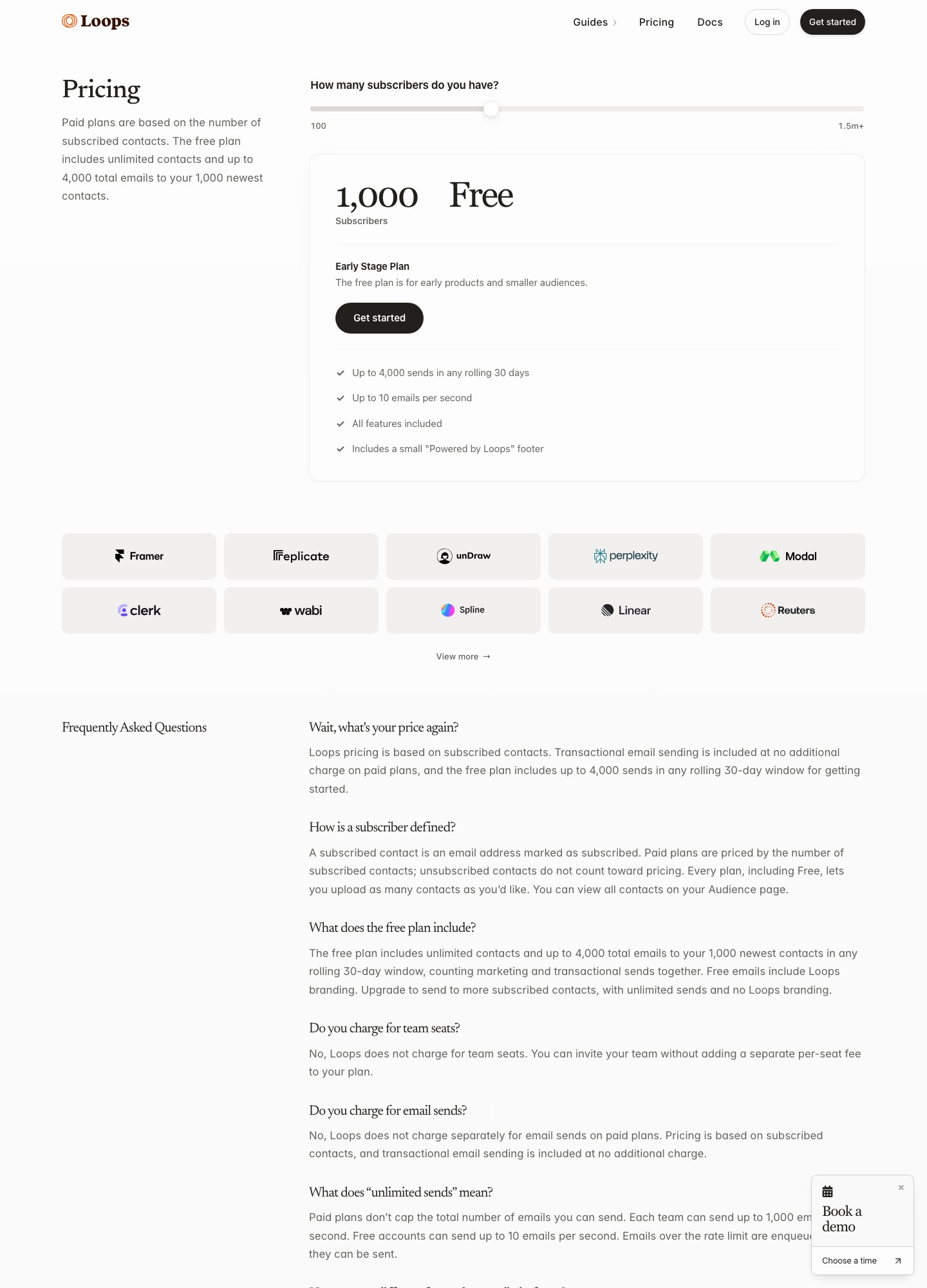
Free: up to 4,000 sends per 30 days to your 1,000 newest contacts. About $99 a month at 10,000 subscribers, $249 at 50,000.
The free tier and where it ends
Loops takes first place for the stage this page is about: a founder who has no billing yet, wants a free plan with every feature, and needs an editor that does not depend on an engineer. Once Stripe, Paddle or Lemon Squeezy is live the order can change, which is why the next entry makes the case for Sequenzy. Loops' pricing page describes its free Early Stage plan as unlimited contacts but up to 4,000 sends in any rolling 30 days, delivered to your 1,000 newest contacts, with every feature included and a small "Powered by Loops" footer. The arithmetic is tight but workable: 1,000 contacts at four emails each is exactly 4,000 sends, so a fifth email in a month to a full list tips you over. The paid price is a slider on subscriber count. When it was read on October 7, 2026 it showed $99 a month at 9,998 subscribers and $249 at 49,989. For anything between 1,000 and 10,000 contacts, move the slider to your own number before you commit to a launch plan built around this tool.
What to build first
Loops suits the founder who does not write code and still wants to own onboarding. Your app tells Loops that something happened, by posting an event with an email address, an event name and properties as the send-event reference shows, and a workflow drawn in the editor decides what follows. Three workflows are enough for a first launch: a welcome on signup, a reminder when nobody has triggered your key activation event after three days, and a trial-ending notice. Loops says addresses at @example.com and @test.com return success without sending anything, which makes it safe to wire the events up in staging. If you design templates in MJML elsewhere, Loops lets you bring your own.
Where it stops fitting
The constraint is cost at the edge of the free plan. A startup that grows from 1,000 to 3,000 users on a thin runway should read the slider for that count before it happens, because the cheapest way past the free ceiling is not published as a flat step. Transactional sending is included at no additional charge on paid plans, so you do not need a second vendor for password resets once you pay. Stripe events are not wired in for you: your own webhook handler has to send them as events, which is a small piece of code but code nonetheless. If that billing plumbing is the main job, weigh it against the Sequenzy entry below, and read Customer.io vs Loops if you expect a richer canvas later.
Sequenzy
Best for: SaaS products that will bill through Stripe, Paddle or Lemon Squeezy and want product email, newsletters and billing email in one account.
Free: 2,500 emails a month. $19 = 15,000, $29 = 30,000, $49 = 60,000. Unlimited contacts.
The free tier and where it ends
Sequenzy's pricing page lists a free tier of 2,500 emails a month with no feature gates and no credit card, and says contacts and sending domains are unlimited on every plan. Because it counts emails rather than people, a 500-person waitlist that gets four emails a month uses 2,000 of the 2,500 and pays nothing. The first paid step is $19 a month for 15,000 emails, which covers 2,000 contacts at four emails each (8,000 emails) with room to spare. The tiers above it are $29 for 30,000, $49 for 60,000 and $99 for 120,000. Yearly billing is listed at $205, $313 and $529 for the first three paid tiers, so $19 a month for twelve months is $228 against $205 paid up front.
What to build first
Pre-revenue, build three things: a welcome email at signup, a nudge two or three days later for people who have not done the one action that makes the product useful, and a short note from you that asks a question. Once billing exists this account earns its place at the top of the shortlist. Sequenzy's homepage says to connect Stripe or PostHog once, or send your own events with one POST, and each event starts the right flow for a segment built from plan, MRR and engagement data; the pricing page lists Stripe, Paddle and Lemon Squeezy integrations on every plan. For failed payments, the homepage says Stripe's invoice.payment_failed event starts a dunning email flow with a card-update page. That covers the emails. How often the card is retried is configured in Stripe or Paddle, and Sequenzy publishes no recovery rate, so leave one out of your forecast.
Where it stops fitting
Second place is a judgement about SaaS products with a supported billing provider: for those, it would move above Loops. If you have no pricing page yet, the free plans of Loops or Resend do the pre-revenue job equally well, and you can move the day billing starts. Everything stated here comes from Sequenzy's own pricing and feature pages; the vendor publishes no independent deliverability figures, so send test messages to Gmail and Outlook inboxes before you trust it with password resets. If your product is a content business rather than software, the newsletter tools further down are a closer match. Our dedicated page for Stripe-billed products covers the billing side in more depth.
Resend
Best for: Engineering-led teams whose first emails are transactional and who may add lifecycle automation later.
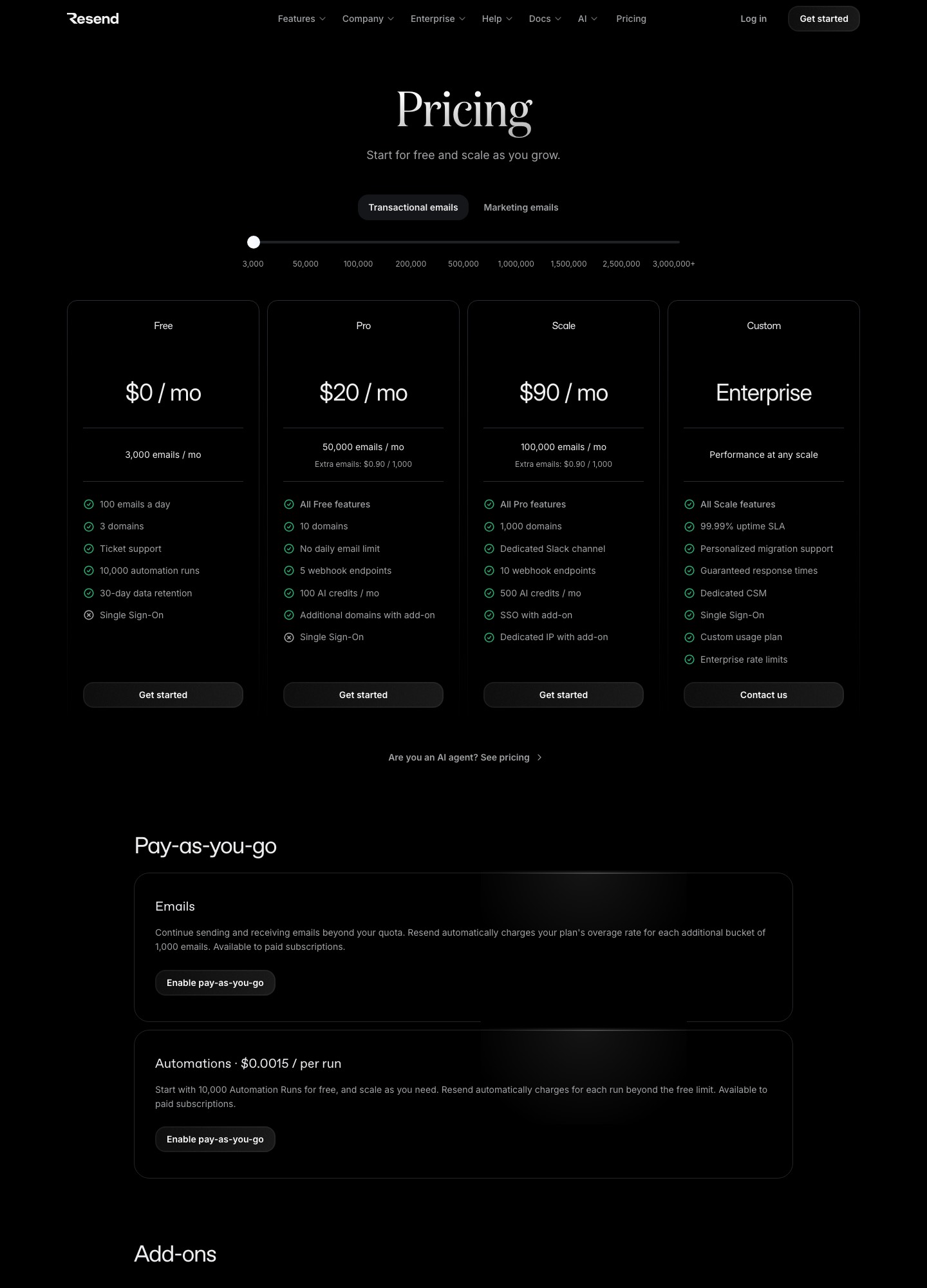
Free: 3,000 emails a month, 100 a day. Pro $20 = 50,000. Scale $90 = 100,000. Extra emails $0.90 per 1,000.
The free tier and where it ends
Resend's pricing page lists Free at 3,000 emails a month with a 100-a-day cap and three domains. The daily cap is the detail that bites at launch: a one-off announcement to 500 waitlist addresses takes five days to go out on Free, while on Pro it is immediate. Pro is $20 a month for 50,000 emails, with extra emails at $0.90 per 1,000, so the 40,000 emails a month that 10,000 contacts receive at four each stay inside the $20. Scale is $90 for 100,000 emails on the same page, and the slider shows Pro at $35 for 100,000, so Scale is for what it adds, not for volume.
What to build first
Start with the messages your code already has to send: address verification, magic links or password resets, and receipts. The Send Email reference is one call from Node, and the idempotency option described in Resend's idempotency keys docs stops a retried queue job from mailing the same person twice within 24 hours. Resend also documents test addresses at resend.dev, such as delivered@resend.dev, that simulate delivery, a bounce or a spam complaint, so failure paths get exercised before real users meet them. The pricing page counts 10,000 automation runs on Free, enough to try a short welcome series driven by events your app sends.
Where it stops fitting
Resend charges for volume, not for the number of people you store, which is why it is the cheapest line in the cost model at 10,000 contacts. The trade is thinner marketing tooling: automations exist, but segmenting by plan, MRR or last activity is work you build around the API, and nothing in it knows about Stripe on its own. One engineer who owns email can live with that. A founder who wants to edit onboarding copy without a deploy will feel it quickly. React Email components fit naturally because the same team makes both. For the full head-to-head on price and sending model, see Loops vs Resend.
Brevo
Best for: Founders who want a free plan with a large contact allowance and who may add SMS or a light CRM later.
Free: 300 emails a day. Starter from $9 a month, Standard from $18, priced by monthly email volume.
The free tier and where it ends
Brevo's pricing page calls the Free plan free forever with 300 daily email sends, and its help article on plans adds storage for up to 100,000 contacts and 2,000 contacts in marketing automation. Three hundred a day is about 9,000 a month if you mail every day, so the 8,000 emails that 2,000 contacts receive at four each fit only when spread evenly, and a 500-person launch announcement needs two days. Paid plans are priced by the email volume you select rather than by contacts. Starter starts at $9 and Standard at $18, both beginning at 5,000 emails a month, with Standard adding automation, A/B testing and advanced reports. Yearly plans get a 10% discount.
What to build first
Brevo covers transactional and marketing email from one account, so a first build can be a single list, one welcome email and receipts sent through the same sender. The 2,000-contact automation limit on the free plan is the number to plan around: high enough for a pre-revenue waitlist, low enough that you will notice it the first time traction arrives. If a text message ever matters, such as a payment link or a one-time code, Brevo lists SMS campaigns and transactional SMS, along with web and mobile push and WhatsApp campaigns.
Where it stops fitting
Brevo is a generalist, and it is not organised around product events or subscription state the way Loops and Sequenzy are. The step after Standard is Professional at $499 a month with 10 seats, so the realistic path is Free, Starter, Standard and then a rethink. If your emails depend on Stripe plan or MRR, plan to push that data in yourself. If they are mostly announcements plus a few automations to a big, quiet list, volume pricing beats contact-based plans: the same list that costs $89 a month on MailerLite's monthly readout at 10,000 subscribers is priced by emails sent here.
MailerLite
Best for: Waitlist and content-led startups that want landing pages, forms and a newsletter without a developer.
Free: 250 subscribers, 2,500 emails a month. Comfort from $12 a month at 500 subscribers, $19 at 1,000, $89 at 10,000 (monthly billing).
The free tier and where it ends
MailerLite's pricing page describes the Free plan as a generous way to get started with a real taste of the full platform: up to 250 subscribers, 2 user seats and 2,500 monthly emails. That is far smaller than the 1,000-subscriber free tier older guides quote, so a 500-person waitlist is already on a paid plan. Comfort starts at $12 a month, or $10.80 with annual billing, at 500 subscribers. The monthly-billing readouts on the page then run $19 at 1,000 subscribers, $49 at 5,000 and $89 at 10,000, while Power starts at $25 and adds unlimited monthly emails.
What to build first
A landing page, a signup form and a welcome automation make up the whole MVP, and MailerLite lists all three alongside digital products and an AI writing assistant. Put the landing page on the waitlist domain, embed the form on your pricing page, and send one welcome email that asks a single question, such as what the reader hopes to automate. Its integration list names Stripe, Shopify and WooCommerce, which helps if you sell credits or one-off licences. Product-event triggers are easier to find in Loops and Sequenzy, whose pricing pages describe events and billing triggers directly.
Where it stops fitting
MailerLite's own pricing material says transactional email comes from a separate product, MailerSend, so password resets need a second account. MailerSend lists a free plan of 500 emails a month and a Hobby plan at $6.30 a month for 5,000, shown as $75.60 billed yearly. Subscriber-based billing also hurts a large, mostly dormant waitlist: 10,000 addresses cost MailerLite $89 a month on the monthly readout, where the 40,000 emails of the cost model fit Sequenzy's $49 tier or Resend's $20 Pro plan.
Postmark
Best for: Teams for whom a failed password reset or receipt is the worst possible launch-week bug.
Free: 100 emails a month. Basic $15 = 10,000 emails, extra $1.80 per 1,000. Pro $16.50, Platform $18.
The free tier and where it ends
The free plan on Postmark's pricing page is a test environment, not a launch plan: 100 emails a month and no overages. Real sending starts at Basic, $15 a month for 10,000 emails, which covers 2,000 contacts at four emails each (8,000 emails) with 2,000 to spare. Past 10,000 the price comes from a slider with stops at 10,000, 50,000, 125,000 and 300,000 emails, so a 40,000-email month is not a stop; the 50,000 stop above it reads $55 on Basic, $60.50 on Pro ($16.50 at 10,000) and $66 on Platform ($18 at 10,000), so the dearer plans do not make a growing month cheaper.
What to build first
Postmark separates email into message streams. Its message streams page calls transactional email "typically a unique, high-priority message sent to a single recipient", defines broadcast as email sent to multiple recipients at once, and says "transactional and broadcast traffic never intersect in Postmark, including IP ranges." For an early-stage team that means a first newsletter blast cannot drag down the reputation of your password resets. Set up verification, reset and receipt templates first, and add broadcasts later in their own stream.
Where it stops fitting
Postmark's pricing and message-stream pages describe sending, not onboarding workflows, so a welcome series needs a second tool or scheduled jobs of your own. Basic lists 45-day message history, which is plenty for debugging a launch but short for audits. Treat it as the right pick when the reliability of a few critical messages is the promise you are selling, and the wrong one when a marketer wants to edit sequences. For a side-by-side with the other developer-first sender, read Resend vs Postmark.
Kit
Best for: Founder-led startups building an audience with a newsletter before and alongside the product.
Free: up to 10,000 subscribers, broadcasts only. Creator $33 a month at 1,000 subscribers ($390 billed yearly), $75 at 5,000, $116 at 10,000.
The free tier and where it ends
Kit, formerly ConvertKit, has a very large free tier for a newsletter audience: its pricing page lists up to 10,000 subscribers with unlimited landing pages, forms and email broadcasts, plus tagging and segmentation. What it leaves out is the part a startup needs for onboarding: Visual Automations and email sequences begin on Creator, $33 a month at 1,000 subscribers billed yearly ($390), then $75 at 5,000 and $116 at 10,000 on the page's readouts. Kit also lists a 14-day free trial of paid plans with no credit card.
What to build first
Use the free plan the way a writer would: a landing page for the waitlist, a form on your blog, and a manual broadcast each time you ship something, tagging subscribers by interest so you can narrow later. That builds a real list of up to 10,000 at no cost, but it onboards nobody on its own. The moment you want a three-email welcome sequence you are on Creator, so put $390 a year into the plan from day one if sequences are the point.
Where it stops fitting
Kit's pricing page describes broadcasts, sequences and automations, not transactional sending, so password resets still need a sender such as Resend or Postmark. Its model is subscribers, tags and sequences rather than app users, accounts and events. That works when early traction comes from content and gets awkward once you want to branch on what someone did inside the product. Watch the price curve too: Kit's Creator plan goes from $33 to $116 as the list grows tenfold, while an email-priced tool such as Sequenzy moves from $19 to $49 for the mail those lists would receive.
Customer.io
Best for: Funded teams that already know they want event-driven, multi-channel messaging and have someone to own it.
Essentials $100 a month at 5,000 profiles, $145 at 10,000, $235 at 20,000. A free year through the Startup Program if you raised under $10M.
The free tier and where it ends
Customer.io's pricing page has no free plan, but it makes an offer that matters at this stage: "Raised under $10M? Early-stage companies get a full year free through our Startup Program." Without it, Essentials is $100 a month at 5,000 profiles ($1,200 over a year), $145 at 10,000 profiles and $235 at 20,000, and Premium starts at $1,000 a month billed yearly. If you qualify, the free year funds a lot of experimentation. The bill that arrives in month 13 is the number to model now.
What to build first
Customer.io is event-first: people and objects are profiles, and your app sends attributes and events that trigger visual workflows across email, push, in-app messages and WhatsApp. The first build is bigger than on the other tools here because the data model is the work. Decide which events you will send (signed up, created a project, invited a teammate), name them once and keep the list in a document. Essentials includes 1 million emails a month, so volume is rarely the constraint. Profile count is.
Where it stops fitting
For a team of one or two, overhead is the problem: a workflow canvas only pays off if somebody maintains it. Pre-revenue companies with a few hundred contacts will do better on a free tier from this page and can move to Customer.io once there are several lifecycle journeys and a person responsible for them. The Startup Program changes that arithmetic for companies that qualify, but a free year of a tool nobody has time to configure is still a wasted year. Our Customer.io vs Loops comparison shows how the two differ in practice.
SendGrid
Best for: Teams that already have a Twilio account or expect to send at far higher volume than a pre-seed product will.
Email API trial: 100 emails a day for 60 days. Essentials from $19.95 (50,000 to 100,000 emails). Marketing Campaigns free: 2,000 contacts, 6,000 emails a month.
The free tier and where it ends
Twilio's pricing page for SendGrid shows two free offers. The Email API trial is 100 emails a day for 60 days, and Marketing Campaigns has a free plan of up to 2,000 contacts and 6,000 emails a month. The trial expires, so it is for testing, not for running a product. The free Marketing Campaigns plan is the one that works for a waitlist: 500 contacts at four emails (2,000 emails) fits easily, while 2,000 contacts at four (8,000) does not. On the paid side, Essentials starts at $19.95 with a selector that begins at 50,000 emails a month, and Pro from $89.95 covers 100,000 to 2,500,000 with dedicated IPs included.
What to build first
The first week is mostly configuration: authenticate the sending domain with SPF and DKIM, create an API key restricted to sending, and wire bounce and unsubscribe handling back into your database so you stop mailing dead addresses. After that, the order of work is the same as anywhere: verification and reset messages first, receipts second, a welcome email third. If you plan to use Marketing Campaigns for the waitlist, keep that list separate from transactional recipients so a complaint about a newsletter does not touch account email.
Where it stops fitting
Pricing begins at a volume most pre-seed products will not reach, so below it you are either on the free Marketing Campaigns plan or paying for headroom you do not use. Resend's Pro plan gives the same 50,000 emails for $20, and Sequenzy's $29 tier gives 30,000 with automations included, so SendGrid wins on scale and the Twilio account, not on cost. Teams choosing between it and a smaller sender can start with Postmark vs SendGrid.
Buttondown
Best for: Founders whose first job is a clean update list for beta users and followers.
Free: up to 100 subscribers. Basic $9 a month up to 1,000. Standard $29 up to 5,000.
The free tier and where it ends
Buttondown's pricing page lists Free at up to 100 subscribers, Basic at $9 a month up to 1,000 and Standard at $29 up to 5,000, and says it charges for active subscribers, meaning the people actually receiving your emails. A 500-person waitlist is therefore $9 a month, and a 2,000-person list sits on the $29 tier. Standard tops out at 5,000 subscribers, so a list beyond that needs a different plan or a different tool.
What to build first
This is the lightest way to run a build-in-public update: write the note, send it, keep the archive. The pricing page lists a custom archive domain on Standard, which lets the archive live on your own site. For a startup, the useful habit is a short monthly "what shipped" note to beta users. It earns replies, and it gives you a list that already knows you before any automation exists.
Where it stops fitting
The plans on Buttondown's page are defined by subscriber counts, with no mention of event triggers, product-state segments or transactional sending, so it is a companion to a lifecycle tool rather than a replacement. Pair it with Resend or Postmark for product email, and expect to move the list when you want onboarding sequences. Newsletter authors weighing it for a one-person setup will find the same tool judged by different priorities on the solopreneur page.
Mailchimp
Best for: Founders who inherit an existing Mailchimp account or need its integration catalogue.
Free: 250 contacts, 500 sends a month (250 a day). Standard from $20 a month at 500 contacts.
The free tier and where it ends
Mailchimp's pricing page lists Free at up to 250 contacts and 500 sends a month with a cap of 250 a day, so a 500-person waitlist is already past it. Standard starts at $20 a month at the default 500-contact selector, with up to 6,000 emails a month at that selector, and larger lists are quoted as custom pricing. Contacts, not emails, set the price. A 14-day Standard trial is also shown.
What to build first
If you already hold a Mailchimp audience from an earlier project, the quickest MVP is to reuse it: one welcome automation, one signup form and a tag per traffic source. The listed features include segmentation, marketing automation, A/B and multivariate testing and custom-coded email templates, the last of which matters if you hand-write HTML. The integration catalogue is the other reason to stay: Shopify, WooCommerce, Canva, Zapier, Square, Wix, Salesforce and WordPress are all named.
Where it stops fitting
It ranks last for runway reasons. At 500 contacts, Mailchimp's $20 already costs more than Brevo's $9 entry point, MailerLite's $12 or Buttondown's $9. Sending is also metered at 6,000 emails a month on that selector, so a product that mails users four times a month hits the cap at 1,500 contacts. Choose it for the integrations or for muscle memory, not for budget.
Mistakes that cost a startup runway
- Importing the waitlist into a contact-priced plan unfiltered. A list that grew from a viral post has thousands of people who never opened a message; on MailerLite or Kit each one counts toward the tier.
- Mixing launch broadcasts with password resets on the same stream. One spam complaint from a newsletter should not touch account email, which is the case Postmark's message streams are built for.
- Choosing a canvas nobody will maintain. A rich workflow tool with no owner turns into a set of stale, contradictory emails within a quarter.
- Treating the free year as free. If you take the Customer.io Startup Program, put the month-13 price in your forecast now.
- Polishing HTML before the message works. A hand-built template in a builder is a day of work for an email that may get rewritten twice by the end of the month; see the bootstrapped founders page for how to spend that day better.
Launch-week checklist
- Pick the sender you would keep after billing starts, and verify your sending domain with SPF and DKIM.
- Publish a DMARC record in monitoring mode and read the first reports.
- Send address verification, reset and receipt emails to personal Gmail, Outlook and Apple mailboxes, and check the spam folder.
- Ship the welcome email with a reply-to address you actually read.
- Add the activation nudge only after you know which action defines activation.
- Make the unsubscribe link work, and honour it the same day.
- Write one page that says what each email triggers, who receives it and when; the next person to join will need it.
More guidance on picking between these tools by workflow rather than by price is in how to choose an email tool, and the broader startup view is on the startups page.
FAQ
Which email tool is cheapest for an early-stage startup?
It depends on whether the plan counts emails or people. Resend Pro is $20 for 50,000 emails and Sequenzy is $19 for 15,000, neither with a per-contact charge, while contact-priced plans such as MailerLite ($89 at 10,000 subscribers) and Kit Creator ($116) climb with the list. Under 1,000 contacts the free plans of Loops and Sequenzy cost nothing, and under 250 contacts MailerLite does too.
What should an MVP send first?
Send the messages the product cannot work without: address verification, password reset and a receipt, through a sender such as Resend, Postmark or Sequenzy. Add one welcome email, then a nudge three days later for people who have not reached your activation step. Leave newsletters, win-back flows and multi-branch automations until you have customers whose behaviour you can read.
Do I need separate transactional and marketing tools?
Not at first. Sequenzy lists transactional and marketing email in one platform, Loops includes transactional sending on paid plans and Brevo covers both from one account. Postmark is the example of the opposite design: its message streams page says transactional and broadcast traffic never intersect, including IP ranges, which is the argument for splitting once reputation matters.
Is a free tier enough until launch?
For a waitlist of a few hundred, yes. At 500 contacts and four emails each (2,000 emails) Sequenzy, Resend and Loops are free, though Resend caps Free at 100 emails a day and Brevo at 300, so a one-off announcement spreads over several days. Above 1,000 contacts Loops leaves its free plan, and above 250 MailerLite does, so check which ceiling you will hit first.
How do I handle failed payments before I have a dunning process?
Separate the charge from the message. Stripe or Paddle decides when a card is retried; the email tool sends the notice. Sequenzy says Stripe's invoice.payment_failed event starts a dunning flow with a card-update page, while with Loops or Customer.io you send a payment-failed event from your own webhook handler and build the sequence yourself.
When does Customer.io make sense for an early-stage company?
When you have several lifecycle journeys, someone who will own them and a plan across email, push or in-app messages. Its pricing page offers a full year free to companies that raised under $10M, after which Essentials is $100 a month at 5,000 profiles. If you cannot name the person who will maintain the workflows, start on Loops or Sequenzy instead.
How do I move to a different tool when I outgrow one?
Keep the sending domain authenticated, export contacts with their consent status, and rebuild one automation at a time while the old tool keeps running for existing users. Event names and workflow logic do not export, so write down each trigger, delay and exit condition before you start. Kit lists free migrations on its pricing page, and most senders on this page will verify your domain before you move any traffic.
Should an early-stage team design HTML emails in a builder?
Only once the copy works. Plain, short messages from a real address often do the early job, and your sender's own editor is enough for the rest. If you want a designed template, Beefree's free Starter plan lists 10 designs and 6 exports a month and Stripo has a free plan, so test the design before paying; the HTML email builder guide compares them.
What deliverability setup does a new sending domain need?
Authenticate it with SPF and DKIM, publish a DMARC record, send from a domain you own rather than a free mailbox, and keep transactional and bulk traffic apart. Start with low, steady volumes to engaged people, and remove bounces and unsubscribes at once. The email deliverability guide walks through each record.