Postmark vs SendGrid: separate streams or one big platform?
By Mara Levin · Updated October 7, 2026 · Prices and docs checked that day
Postmark is built around keeping transactional and broadcast traffic apart. SendGrid is a larger account with a sending API on one side and a marketing product on the other. That shapes price, templates and what you maintain.
The short answer
Pick Postmark when your app mostly sends receipts, resets and notifications, you want its stream model and 45 days of message history, and you can accept a webhook endpoint that you protect yourself. Pick SendGrid when you need signed webhooks, more than one product under a single contract, or a marketing tool beside the API. On list price, SendGrid starts lower at 50,000 emails, while Postmark publishes a firm number at each volume you pick on its slider.
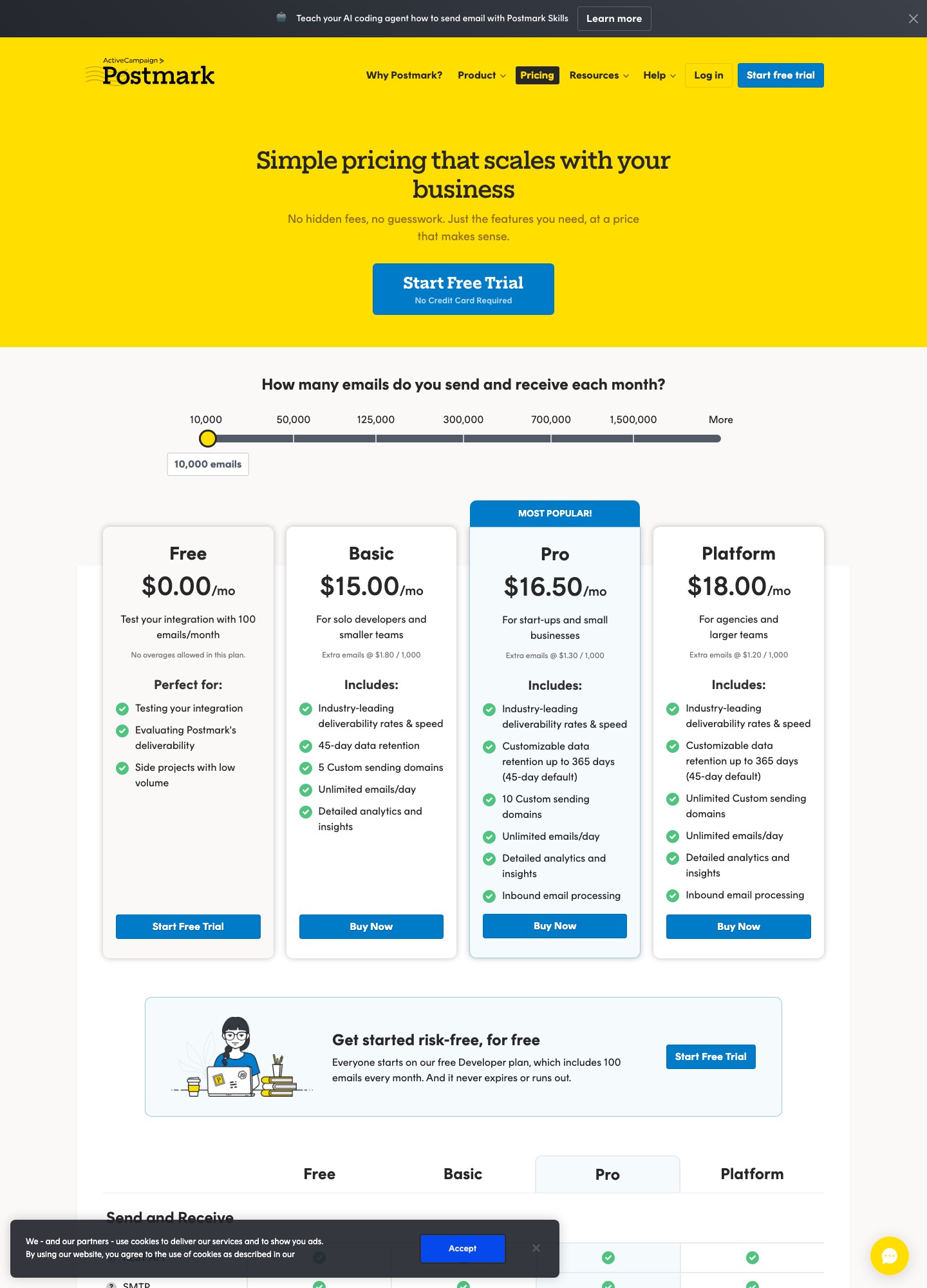
Monthly price at three volumes
| Emails a month | Postmark Basic / Pro / Platform | SendGrid Email API |
|---|---|---|
| 10,000 | $15 / $16.50 / $18 | No paid price listed at this volume; the selector jumps from under 3,000 to 50,000 |
| 50,000 | $55 / $60.50 / $66 | Essentials, starting at $19.95 |
| 100,000 to 125,000 | $115 / $126.50 / $138 at 125,000 (the slider has no 100,000 stop) | Pro, starting at $89.95, for the 100,000 to 2,500,000 band |
Postmark figures are what the volume slider on its pricing page displayed on October 7, 2026. SendGrid figures are from its Email API pricing page, which says exact pricing depends on send volume and features.
How to read that table
The two columns are not the same kind of number. Postmark's slider returns a total for each plan at the volume you pick, and the page's per-plan overage rates are $1.80, $1.30 and $1.20 per 1,000 extra emails on Basic, Pro and Platform. SendGrid shows "starting at" prices for volume bands, with taxes and overages possibly on top. So at 50,000 emails SendGrid's floor is $19.95 against Postmark's $55, but you should open SendGrid's selector with your real feature needs before treating the gap as the final bill.
What does not change is the shape. Postmark's plans differ by features rather than volume steps: Basic at 10,000 emails is $15, Pro $16.50 with customizable retention and inbound processing, Platform $18 with unlimited domains and users. SendGrid steps up by tier: Essentials for the lower band, Pro for the higher one, which is also where a dedicated IP, subusers and SSO appear.

What each one charges extra for
Postmark lists three optional add-ons. A fully managed dedicated IP starts at $50 a month per IP and is offered to customers sending 300,000 emails a month or more, on Pro or higher. Custom activity retention starts at $5 a month, also Pro and above. DMARC monitoring starts at $14 a month per domain. SendGrid includes one dedicated IP on Pro and Premier, with the option to buy more, and sells email testing credits, extra email activity history up to 30 days and expert services as separate purchases.
A concrete comparison: a team sending 400,000 emails a month that wants its own IP will pay Postmark's $50 monthly IP fee on top of the volume price, while on SendGrid the IP is part of Pro. Run both configurations through the selectors before concluding which is lower, because the volume rows move in different directions.
Message streams versus account-level settings
Postmark's central idea is the message stream. Each message carries a MessageStream value, and the API value is outbound for transactional mail and broadcast for mail to many recipients. Postmark's streams page describes separate IP ranges for the two, so that a product announcement cannot drag down a password reset, and states that broadcast mail needs an opt-out link while transactional does not. If you omit the field, the send-email docs say it defaults to the outbound stream.
SendGrid has no equivalent single field. You separate traffic through the choices around it: which product you use (Email API or Marketing Campaigns), subusers on Pro, dedicated IPs and pooling, and unsubscribe groups. That is more flexible and also more to configure. A team that wants the guard rail built into every request will like Postmark's approach. A team that already runs subusers per customer will find SendGrid's model familiar.
What each publishes about deliverability
Postmark's pricing page lists "Industry-leading deliverability rates & speed" in each paid plan and says it shares delivery statistics to major inbox providers on its status page. Its streams page adds that it manually vets each potential customer and has internal anti-abuse systems. SendGrid's page lists a Deliverability Insights dashboard, a Sender Engagement Quality Score, ISP feedback loop data and bounce and block classification into seven categories. These are vendor claims and feature lists, and I am not quoting a rate for either because neither page supplies a figure you can verify. What you can check yourself is cheap: send from your own authenticated domain to a mix of mailboxes and read the bounce and complaint events each one returns. For the wider mechanics, see the deliverability guide.
The API and templates
Postmark's docs push a template path for TypeScript projects: install the postmark package, create one shared client, then call sendEmailWithTemplate. These two snippets are from Postmark's send-email API docs:
import { ServerClient } from "postmark";

export const postmark = new ServerClient(process.env.POSTMARK_SERVER_TOKEN!);
const result = await postmark.sendEmailWithTemplate({
From: "welcome@acme.example",
To: "customer@example.com",
TemplateAlias: "welcome",
TemplateModel: { name: "Ada" },
MessageStream: "outbound",
});
console.log({ messageId: result.MessageID });Postmark returns a MessageID you can correlate with webhook events, and a test token, POSTMARK_API_TEST, lets you validate payloads without delivering anything. Note that you need a confirmed sender signature for the From address, or Postmark replies with a 422.
SendGrid's equivalent is a dynamic template. You design it in a Design Editor or Code Editor, keep several versions, and send by posting to /v3/mail/send with a template_id and your values inside personalizations.dynamic_template_data, which the template reads through Handlebars. The dynamic templates guide walks through it. The extra layer, personalizations, is powerful for per-recipient data and slightly heavier for a single transactional message.
Webhooks and inbound mail
This is the sharpest technical difference. Postmark's webhook documentation says it does not sign requests. It tells you to put Basic HTTP authentication credentials in the webhook URL, and to allowlist Postmark's IP ranges; its sample event handler also de-duplicates by MessageID in your own database. Postmark verifies endpoints for you: when you save a webhook it posts a test for each enabled event type and expects a 200, and it pauses an event type that keeps failing. SendGrid offers a signed Event Webhook (key pair, signature in a request header) and OAuth 2.0, usable together.
For receiving mail, Postmark lists inbound email processing on Pro and Platform, turning a message into JSON posted to your URL. SendGrid documents an Inbound Parse webhook that does the same job. Neither is a reason to choose on its own; it matters mainly if your plan tier would otherwise leave the feature out.
What happens when marketing arrives
Postmark says plainly that it is built for application email, with no list uploads, no WYSIWYG editor and no campaign-based reporting, and that you manage your main lists outside it. You can still send a broadcast stream from your own code. SendGrid's Marketing Campaigns pricing page lists a free plan, Basic from $15 and Advanced from $60 a month, with design and code editors, segmentation and A/B testing. If your product team will later want a newsletter tool, SendGrid keeps both in one vendor; with Postmark you will add a second tool, which many teams are happy to do. The transactional vs marketing email guide covers where that line usually falls.
Choose Postmark if…
- You want stream separation enforced in the request itself rather than in account configuration.
- Message history matters: 45 days by default, customizable up to 365 days on Pro and above with the retention add-on.
- Your volume sits near 10,000 emails a month and you prefer a single clear number per plan.
Choose SendGrid if…
- Your security team requires signed webhook requests.
- You want a marketing product, with a free contact allowance, beside the sending API.
- You need many teammates on one account: its Pro tier lists 1,000 additional teammates against 1 on Essentials.
Switching notes
Moving from SendGrid to Postmark, map each subuser or IP pool to a server or stream first, rewrite dynamic templates as Postmark templates with aliases, and replace signature verification with Basic Auth plus an IP allowlist in front of your webhook route. Moving the other way, add signature verification to your handler and decide how to represent the stream distinction, since SendGrid has no MessageStream field. In both directions, authenticate the sending domain with the new vendor before any traffic moves, and import suppressions first. For a third option often shortlisted next to these two, compare Resend vs Postmark, or see the SendGrid vs Mailgun breakdown, and the transactional email guide.
FAQ
Is Postmark more deliverable than SendGrid?
Neither vendor's pricing or docs pages that I read publish an inbox-placement rate you could compare, so this page does not rank them on it. What each does publish is structure. Postmark describes separate sending infrastructure for transactional and broadcast mail and says it vets new customers by hand. SendGrid lists dedicated IPs, automated warm-up and a deliverability insights dashboard. Test both with your own domain and judge from your own bounce and complaint data.
Why does Postmark cost more than SendGrid at 50,000 emails?
It may not once features are counted, but the numbers are different kinds. Postmark's slider reads $55 for Basic at 50,000 emails. SendGrid lists Essentials as "starting at $19.95" for its 50,000 to 100,000 band, and says exact pricing depends on volume and features. Compare your real configuration on SendGrid's selector, and include any add-on you need on either side.
Can Postmark send newsletters the way SendGrid Marketing Campaigns does?
Not in the same way. Postmark's message streams page says it does not offer list uploads, a WYSIWYG editor or campaign-based reporting, and that you keep your main lists outside Postmark. A broadcast stream does exist for mail to many recipients, sent from your own application, and it requires an opt-out link. SendGrid's Marketing Campaigns product has editors, segmentation and a free plan.
How do I secure the webhook endpoint on each?
They differ. Postmark's webhook docs say it does not sign webhooks and recommend HTTP Basic Auth in the URL and an allowlist of Postmark's IP ranges. SendGrid offers a signed Event Webhook, verified with a public key against a signature header, and OAuth 2.0 as an independent option. If your security review requires signature checks, that is a real point for SendGrid.