Which email tool for a product that bills through Stripe?
By Mara Levin · Updated October 7, 2026 · Prices and documentation checked that day
Turn on Stripe's own emails first: the Dashboard can mail customers about failed payments, expiring cards, renewals and ending trials. Add an email tool when you want your own onboarding, upgrade and win-back messages triggered by Stripe events. For a small subscription app, Sequenzy ranks first below, with Loops close behind; teams selling to companies should look at Userlist.
What Stripe already emails for you
Per Stripe's customer email guide, the Dashboard can send: an email after each failed card payment (the setting is "Send emails when card payments fail"), a reminder 7 days before a free trial ends, renewal reminders for subscriptions that charge automatically, and a notice one month before a card on file expires. Those emails can link to a Stripe-hosted page where the customer updates a payment method, or to your own page, and they use your Stripe branding settings.
What they are not is a lifecycle program. There is no welcome series, no usage-based upgrade prompt, no win-back after cancellation and no segmenting by plan. That gap is what the tools below fill, and it is also why a small product can run for a long time on Stripe's emails alone.
Stripe events worth wiring to email
| Event | What Stripe says | Typical email |
|---|---|---|
invoice.payment_failed | A payment for an invoice failed; notify the customer, consider Smart Retries | Dunning with a card-update link |
customer.subscription.trial_will_end | Sent 3 days before a trial ends | Trial-ending reminder |
invoice.paid | Invoice paid; provision access once the subscription is active | Receipt or thank-you |
invoice.upcoming | A few days before renewal, per your Dashboard setting | Renewal notice |
invoice.payment_action_required | The invoice needs customer authentication | Confirm-your-payment prompt |
customer.subscription.deleted | Sent when a subscription ends | Cancellation follow-up, win-back |
Source: Stripe, Using webhooks with subscriptions, read October 7, 2026.
Retries, webhooks and the parts an email tool does not do
Three details from Stripe's documentation change how you plan. First, retrying the charge is Stripe's job: Smart Retries has a recommended default of 8 tries within 2 weeks, a custom schedule allows up to three retries, and certain hard declines, such as a lost or stolen card, are not retried until a new payment method arrives. An email tool should ask for a new card; it cannot make the old one work.
Second, the subscription status moves independently of your emails. A subscription that fails all retries can be set to cancel, to become unpaid or to stay past due, depending on your Dashboard settings, and Stripe advises revoking access when it is canceled or unpaid. Make your dunning copy match the setting you chose, or customers will be told they will lose access when they will not.
Third, webhooks have consequences. If Stripe does not receive a successful response to invoice.created, it can delay finalizing invoices with automatic collection for up to 72 hours, across every endpoint on the account, including third-party tools. In live mode a failing endpoint is retried for up to 3 days. Monitor each endpoint you add.
What it costs at 5,000 and 10,000 contacts
| Tool | 5,000 contacts | 10,000 contacts |
|---|---|---|
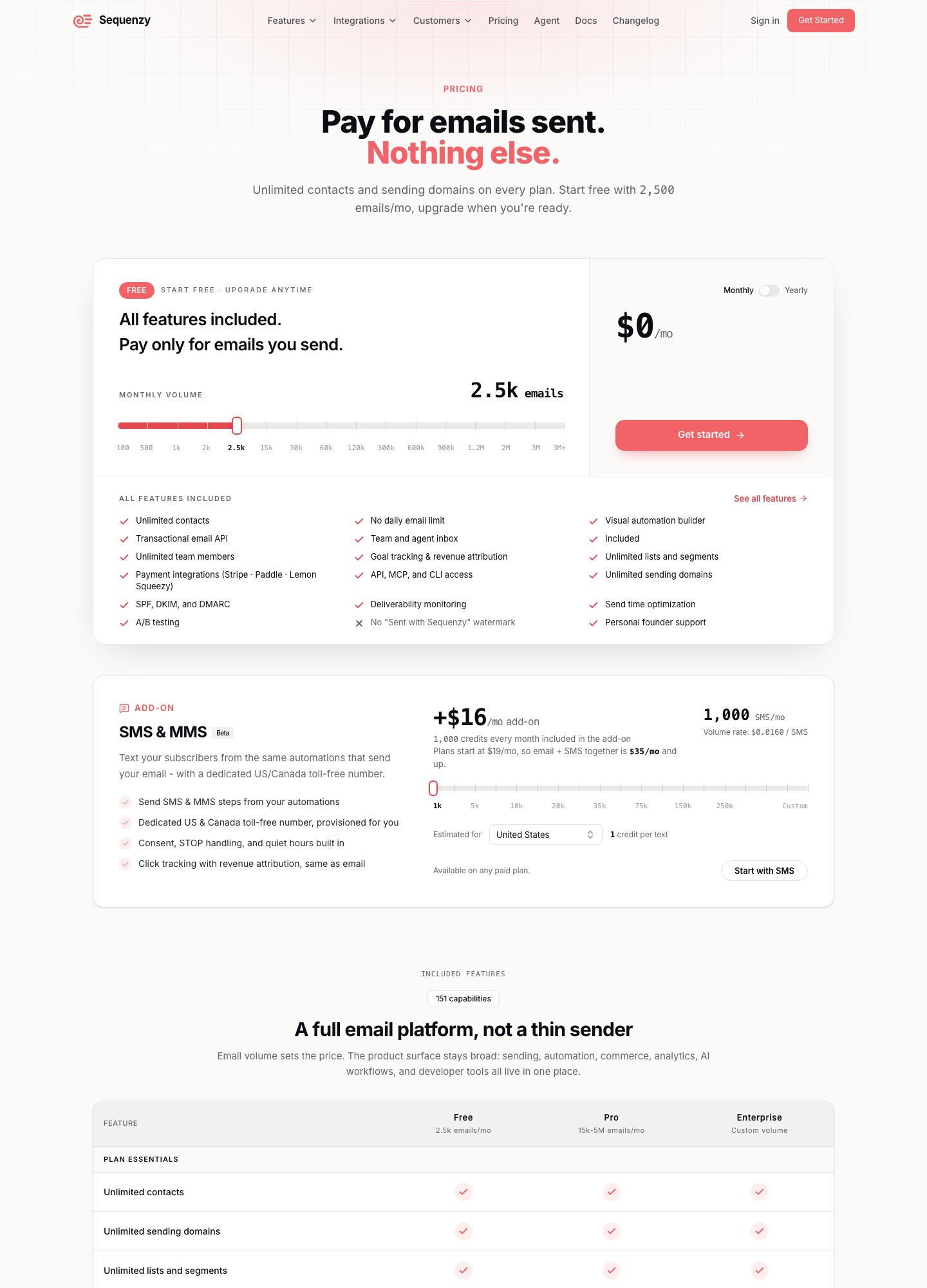
| Sequenzy (priced by emails; 20,000 and 40,000 a month assumed) | $29 | $49 |
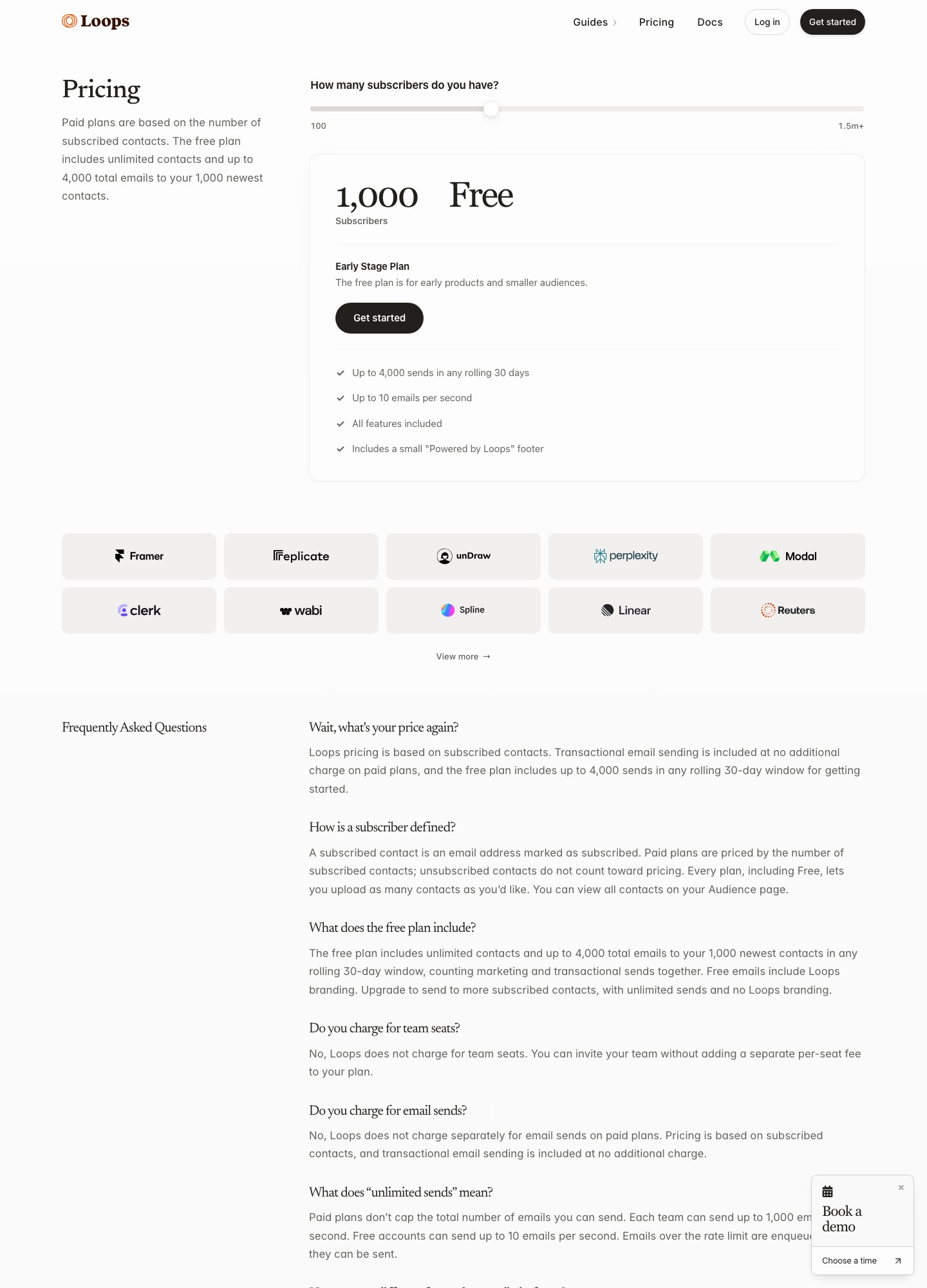
| Loops | $48 (at 4,788) | $99 (at 9,998) |
| Drip | $89 | $154 |
| Customer.io Essentials | $100 | $145 |
| Userlist Basic | $149 | $149 |
| Encharge Growth (monthly) | $179 | $249 |
| Resend Pro (API only, you write the handler) | $20 | $20 |
Each vendor's pricing page, read October 7, 2026. Sequenzy's 30,000-email step is $29 and its 60,000-email step is $49, so 20,000 and 40,000 emails a month land on those steps. Resend's Pro plan covers up to 50,000 emails.
Sequenzy
Best for: Small subscription apps on Stripe, Paddle or Lemon Squeezy that want billing-triggered email and a failed-payment flow in one account, priced by emails rather than contacts
Price: Free for 2,500 emails a month; $19 (15,000), $29 (30,000), $49 (60,000), $99 (120,000); contacts unlimited.
How it connects to Stripe
Sequenzy's pricing page lists Stripe with segmenting by MRR and LTV, plus Paddle, Lemon Squeezy, Polar, Creem and Dodo Payments, on every plan including the free one. Its homepage says you connect Stripe or PostHog once, or send your own events with one POST, and that each event starts a flow for a segment built from plan, MRR and engagement data. Custom attributes such as MRR and plan are part of the subscriber model.
Failed payments
The homepage states that Stripe's invoice.payment_failed event starts a dunning email flow with a card-update page. That is the email half of recovery. When the card is charged again is decided by Stripe's retry settings (see the Smart Retries section below), and Sequenzy publishes no recovery rate, so do not budget around one. The same pages name win-back on cancellation and onboarding on new subscriptions as event-triggered flows.
Why it ranks first here, and where it is weaker
For this audience it is the entry whose pages combine a Stripe connection, billing-event flows and pricing by email volume with unlimited contacts, so a product with many free users does not pay for them. It is not the pick for everyone: it is a younger product with a shorter track record than Customer.io, the free plan adds a "Sent with Sequenzy" watermark that paid plans remove, and a B2B product that needs company-level accounts is better served by Userlist. Its free tier of 2,500 emails a month covers a small trial funnel but not a growing list.
Loops
Best for: Stripe-billed products that want a documented, event-by-event Stripe integration and a visual editor the non-developers can use
Price: Free: up to 4,000 sends in a rolling 30 days to your 1,000 newest contacts. Paid: $99 a month at 9,998 subscribers, $249 at 49,989.
How it connects to Stripe
Loops documents a Stripe integration built on incoming webhooks. It can create and update contacts and send events that trigger workflows. The events it handles include customer.subscription.created, .paused, .resumed, .trial_will_end and .deleted, invoice.paid, invoice.payment_failed and invoice.upcoming, checkout.session.completed and the dispute events. Contacts are matched on the customer's email address, and the synced data is the email plus an optional name.
What to know before relying on it
The docs say events outside the supported list are ignored and that only events carrying an email address can be processed, so a Stripe event with no customer email does nothing. You choose, per event, whether it triggers a workflow or only updates data. Building the email itself happens in a workflow with the trigger "Event received", then Stripe, then the event. Loops does not describe a card-update page of its own, so a dunning email would link to Stripe's customer portal or your own billing page.
Price and fit
According to the pricing page, paid plans are priced by subscribed contacts and unsubscribed contacts do not count; the readout was $48 at 4,788 subscribers, $99 at 9,998 and $249 at 49,989. Transactional sending is included on paid plans and there is no per-seat fee. A product with a big base of dormant sign-ups pays for each one, which is where volume-priced senders can cost less.
Userlist
Best for: B2B SaaS where customers are teams and lifecycle email should follow the company as well as the person
Price: Basic $149 a month for up to 10,000 users, then $10 per extra 1,000; Professional $349 at 10,000 users, then $12 per extra 1,000.
How it connects to Stripe
Userlist's integrations page lists Stripe and Chargebee under Billing, without the "Native" badge it gives to tools like Segment and Zapier, and groups two payment-recovery products next to them. The page does not say which fields or events sync. Ask for the field list before building segments on plan or MRR, and confirm how a failed invoice reaches the tool.
Where it differs
Its pricing page says Basic now includes company accounts, and the feature table lists company profiles with an activity feed, company segments and company-triggered campaigns. If your Stripe customer is an organization with several users, this is the closest fit on the list. The head-to-head with Customer.io is on Userlist vs Customer.io.
Cost and terms
Plans include a message allowance of five times your tracked users with a 500,000 floor, and $1 per 1,000 messages above it, per the billing docs. The trial is 14 days with a card required up front, and the FAQ offers 50 percent off for 12 months to SaaS companies that raised under $500k, for new accounts only. At 10,000 users it costs $149 a month, which is more than most tools here at the same list size.
Customer.io
Best for: Teams with engineers who want one flexible profile store for people, companies and several channels, and will build the Stripe feed themselves
Price: Essentials from $100 a month at 5,000 profiles ($145 at 10,000, $235 at 20,000); Premium from $1,000 a month, billed yearly.
How billing data gets in
The pages read for this guide describe Customer.io's data model and plans but do not show a Stripe connector, so treat Stripe as something you feed in: your webhook handler listens for Stripe events and sends them to Customer.io through its API. That is more work than a ready-made integration, and it gives you control over which Stripe fields become attributes. Check its pricing page for the data integrations each plan includes.
What it offers
Essentials lists 5,000 profiles (people plus objects), a visual workflow builder, two object types, 1 million emails a month and email and community support. Premium adds custom volume, ten object types and premium support. Because companies can be stored as objects they count as profiles, so a B2B account model raises the bill. Customer.io's pages also describe a Startup Program that gives companies that raised under $10M a full year free.
Cost and fit
Profile pricing climbs steadily: $100 at 5,000, $145 at 10,000, $235 at 20,000, $325 at 30,000, $415 at 40,000 and from $505 at 50,000, with extra profiles at $0.009 each. Beyond about 50,000 the page points toward Premium. It is the right choice when lifecycle email is a core part of the product and an engineer owns the pipeline, and the wrong one for a founder who wants the first dunning email running this afternoon.
Encharge
Best for: SaaS teams that want behavior-based email with listed Stripe and Chargebee connectors and are comfortable paying more per subscriber
Price: Growth $99 a month for up to 2,000 subscribers ($79 billed yearly); $179 at 5,000; $249 at 10,000. Premium $159 at 2,000.
Connectors and features
Encharge's pages list integrations including Stripe, Chargebee, HubSpot, Salesforce, Segment, Shopify and Zapier, along with a visual flow builder, behavior-based emails, webhooks and a transactional email API. Which Stripe events trigger flows is not spelled out in the pricing page, so confirm the event list for the failed-payment and trial cases you need.
What it costs
Growth, billed monthly, is $99 for up to 2,000 subscribers and $79 a month if billed yearly; the selector showed $179 at 5,000, $249 at 10,000 and $389 at 25,000. Premium, which adds the CRM connectors and transactional email, is $159 at 2,000 subscribers and $269 at 5,000. Email beyond the plan's multiple of your subscriber count is billed at $100 per 100,000 emails.
When it fits
Pick it when behavior inside the product matters as much as billing state and you need Chargebee as well as Stripe. At a 5,000-subscriber list it costs about twice what Loops or Customer.io's Essentials do, so the case rests on features rather than price.
Drip
Best for: Products that sell online beyond subscriptions and want one tool for revenue-based segments, with a Stripe connection
Price: $39 a month for 1 to 2,500 people; $89 at 5,000; $154 at 10,000; $289 at 20,000. 14-day free trial.
What it supports
Drip's pages list Stripe among its integrations next to Shopify, WooCommerce, BigCommerce and Zapier, with email marketing, behavior-based automations, dynamic segments and ecommerce revenue attribution. Its heritage is in online shops, so check how it represents a recurring subscription before choosing it for a SaaS.
How it bills
The page says cost is based on the number of active people and the volume of emails sent in the month. Slider readouts were $39 for the first 2,500 people, $89 at 5,000, $154 at 10,000, $209 at 15,000 and $289 at 20,000, with unlimited sends on those tiers. A 14-day trial needs no credit card.
Fit
It suits a product that also sells one-off items or add-ons, where revenue per subscriber matters. For pure subscription lifecycle email, the documented event lists of Loops and the volume pricing of Sequenzy are closer matches.
Resend with your own webhook handler
Best for: Developer-led teams that would rather write the Stripe handler than adopt a lifecycle platform, and send mostly transactional billing emails
Price: Resend Free: 3,000 emails a month (100 a day). Pro $20 for 50,000 emails; Scale $90 for 100,000.
How the pattern works
You register an endpoint with Stripe, verify that incoming events come from Stripe (Stripe's webhook guide says to), handle the events that matter and call a sending API. Resend is a typical choice for the sending side. Stripe retries a webhook that fails to get a good response for up to three days in live mode, so the handler has to be safe to run twice; Resend documents an idempotency key for that, in its API documentation.
What you give up
Nothing in a handler tracks who has already received the day-three dunning message, stops a sequence when the invoice is paid, or lets a marketer edit copy without a deploy, unless you build it. Segments, a drag-and-drop editor, unsubscribe management and scheduling are all yours to add or buy. That is fine for three or four fixed billing emails and painful for a lifecycle program.
Cost
On Resend's pricing page the Free plan covers 3,000 emails a month with a 100-per-day cap, Pro is $20 for 50,000 emails and Scale is $90 for 100,000. For a few thousand billing emails that is the lowest bill on this page, and the engineering time is what it really costs.
The annual view at 5,000 contacts
Monthly prices hide how far apart these tools get over a year. Using the 5,000-contact column above and multiplying by 12: Sequenzy at 20,000 emails a month is 12 x $29 = $348; Loops at $48 is 12 x $48 = $576; Drip at $89 is $1,068; Customer.io Essentials at $100 is $1,200; Userlist Basic at $149 is $1,788; Encharge Growth at $179 is $2,148 on monthly billing. A Resend handler at $20 a month is $240 a year, before the developer hours it takes to build and maintain. Sequenzy and Loops also bill differently, by emails and by contacts respectively, so a list that doubles moves the two lines in different ways.
The cheapest tool is not automatically the right one. A $348 line that saves an engineer a week of webhook work is a better deal than a $240 line that costs that week, and a company model that Userlist provides out of the box can justify its price if your customers are teams. Treat the table as a floor for budgeting, then trial the one or two that match how your Stripe data is shaped.
How to choose, by situation
- Pre-revenue or a few dozen customers. Stay on Stripe's own emails and add a free plan for onboarding, such as Sequenzy's 2,500 emails or Loops' 4,000 sends, when you have a sequence worth sending.
- A subscription app with a growing free tier. Prefer volume pricing. Sequenzy bills by emails with unlimited contacts, while Loops, Drip and Customer.io bill by contacts or profiles.
- Sales to teams and agencies. Userlist's company accounts, or Customer.io objects, model the account. Read Userlist vs Customer.io and email tools for B2B SaaS.
- An engineer who wants control. A Resend handler is the cheapest and the most work; the Loops vs Resend comparison shows where the line is.
- Churn is the main worry. Combine Stripe's retries with a dunning flow and read email tools for churn prevention and the Stripe email integration guide.
Subscription statuses and what the email should say
Stripe's subscription webhook guide defines the statuses a subscription moves through. Dunning and win-back copy is only honest if it matches the status the customer is actually in.
| Status | What Stripe says | What the email should do |
|---|---|---|
trialing | In a trial; safe to provision the product | Show value before the trial-ending reminder |
active | In good standing | Receipts, renewal notices, upgrade prompts |
past_due | Payment on the latest finalized invoice failed or was not attempted; Stripe might retry | Ask for a new card, without threatening immediate loss of access |
unpaid | Only if your settings choose it; invoices keep generating but payment is not attempted; revoke access | Say access is paused and how to reactivate |
canceled | Terminal state; automatic collection for unpaid invoices is disabled | Cancellation follow-up and win-back, not payment requests |
paused | A trial ended without a payment method and the setting is pause; no new invoices | Invite the customer to add a payment method and resume |
Setting it up in five steps
- Decide what Stripe keeps. In the Dashboard, leave on whichever of the failed-payment, expiring-card, renewal and trial-ending emails you do not plan to replace.
- Write down event to email. One line each: which event starts which message, who receives it, and what stops it. The table above is a starting list.
- Connect the tool and pick events. With Loops you choose, per event, whether it triggers a workflow or only updates data. With a handler you write, you subscribe only to the events you handle.
- Test in a sandbox. Stripe's customer email guide says a sandbox does not send customer emails automatically unless the customer's address belongs to your verified email domain or a team member, so use those addresses.
- Watch the first live billing cycle. Confirm that a failed card produces exactly one dunning message from the system you meant, and that the sequence stops when the invoice is paid.
Mistakes that cause double or missing emails
- Two systems send the same dunning email. If Stripe's "Send emails when card payments fail" setting stays on and your tool also reacts to
invoice.payment_failed, customers get two messages per failure. Pick one. - Mixing up the two trial reminders. The Dashboard setting reminds customers 7 days before a free trial ends, while the
customer.subscription.trial_will_endevent fires 3 days before. Use both deliberately or neither. - Assuming every failure is retried. Hard declines such as a lost or stolen card are not retried until a new payment method appears, so a retry-based sequence can wait for nothing.
- Sending customers to a dead link. Stripe's hosted payment page link stops working in some cases, for example 30 days after the trial-ending email, or once the subscription is canceled, unpaid or past its renewal period. Link to a stable billing page if you can.
- Treating a missing email address as a success. Loops ignores Stripe events that carry no email address, so a customer created without one will never enter a flow.
Switching later
Billing emails are the easiest to move, because the trigger is a Stripe event, not data trapped in a tool. Keep a written list of which events start which email, export contacts with their plan attribute and unsubscribe status, and run old and new flows in parallel for one billing cycle. The risky part is the suppression list: anyone who unsubscribed in the old tool must be carried over, or a migration becomes a complaint.
FAQ
Does Stripe send dunning emails itself?
Yes. In the Dashboard you can enable failed payment notifications, and Stripe's customer email documentation says it then emails the customer after each failed payment with a chance to update the payment method. It can also send expiring card emails one month before a card expires, renewal reminders, and a trial-ending reminder seven days before a free trial ends, each linking to a Stripe-hosted page or your own billing page. A separate email tool earns its place when you want your own wording, onboarding, upgrade and win-back flows, not only payment notices.
Who retries the failed payment, Stripe or the email tool?
Stripe does. Its retry documentation describes Smart Retries, with a recommended default of 8 tries within 2 weeks, or a custom schedule of up to three retries, and says it will not retry after certain hard declines such as a stolen or lost card. An email tool such as Sequenzy sends the message that asks the customer to update their card; it does not charge the card again.
Which Stripe events matter most for email?
Five cover most cases: invoice.payment_failed for dunning, customer.subscription.trial_will_end (sent 3 days before a trial ends) for conversion reminders, invoice.paid for receipts, invoice.upcoming for renewal notices, and customer.subscription.deleted for cancellation and win-back flows. Stripe's subscription webhook guide also lists invoice.payment_action_required for payments that need customer authentication, and refund and dispute events that are usually internal alerts.
What is the cheapest way to email Stripe customers?
For a handful of billing emails, Stripe's own notifications plus a transactional API such as Resend's Free plan (3,000 emails a month) cost nothing or close to it, at the price of writing a handler. For lifecycle flows without code, Sequenzy's free plan (2,500 emails a month) and Loops' free plan (4,000 sends to the 1,000 newest contacts) are the lowest entry points on this page. Past 5,000 contacts the monthly differences grow, as the cost table above shows.
Do I need a tool with a native Stripe integration?
Not always. Loops documents its Stripe events, Sequenzy and Drip and Encharge list Stripe among their integrations, and Userlist lists it too without calling it native. Customer.io and a Resend setup both depend on you sending events through an API. A listed connector saves setup, but check which events it forwards: Loops, for example, ignores events outside its supported list.
Can a failing webhook endpoint affect my Stripe billing?
It can. Stripe's subscription webhook documentation says that if it does not get a successful response to invoice.created, it delays finalizing invoices that use automatic collection for up to 72 hours, and this applies to every webhook endpoint on your account, including third-party services. If you point several tools at Stripe, monitor each endpoint and remove ones you no longer use.
What should B2B teams on Stripe choose?
If the Stripe customer is a company with several users, start with Userlist, whose Basic plan includes company accounts, or model companies as objects in Customer.io. Both cost more than a contact-based sender at the same list size. If billing is per seat but you only need individual-level email, Sequenzy or Loops will do with less setup. See the Userlist and Customer.io comparison for the numbers.
Can I email Stripe customers without a monthly plan at all?
Yes, within limits. Stripe's own emails need no extra tool, Sequenzy's free plan allows 2,500 emails a month and Loops' free plan allows 4,000 sends in a rolling 30 days to its 1,000 newest contacts, with a small footer in both cases. Resend's Free plan allows 3,000 emails a month. These are enough for a prototype or a small paid base, not for a trial funnel with thousands of sign-ups.
Can I segment by plan, MRR or lifetime value?
Only some tools say so. Sequenzy's pricing page lists Stripe with segmenting by MRR and LTV, and custom attributes such as MRR and plan. Userlist lists company segments. Loops' Stripe documentation says the data it syncs is the email address and an optional name, so plan or revenue fields would have to be sent to it yourself through its API. Ask each vendor which Stripe fields become attributes before you design a segment around one.
Which of these tools reports revenue from emails?
Sequenzy's pricing page lists revenue attribution, custom goal tracking and configurable attribution windows on every plan. Drip's pages mention ecommerce revenue attribution, which is built around purchases rather than recurring billing. For the others, the pages read did not describe revenue reporting, so assume you will measure results in Stripe or your own analytics and verify the claim in a trial before relying on it.