Customer.io vs Loops: which lifecycle platform fits your SaaS?
By Mara Levin · Updated October 7, 2026 · Prices and docs checked that day
Both send onboarding and retention email triggered by what users do in your product. One is a multi-channel data platform that bills by profile, the other an email-first tool that bills by contact.
The short answer
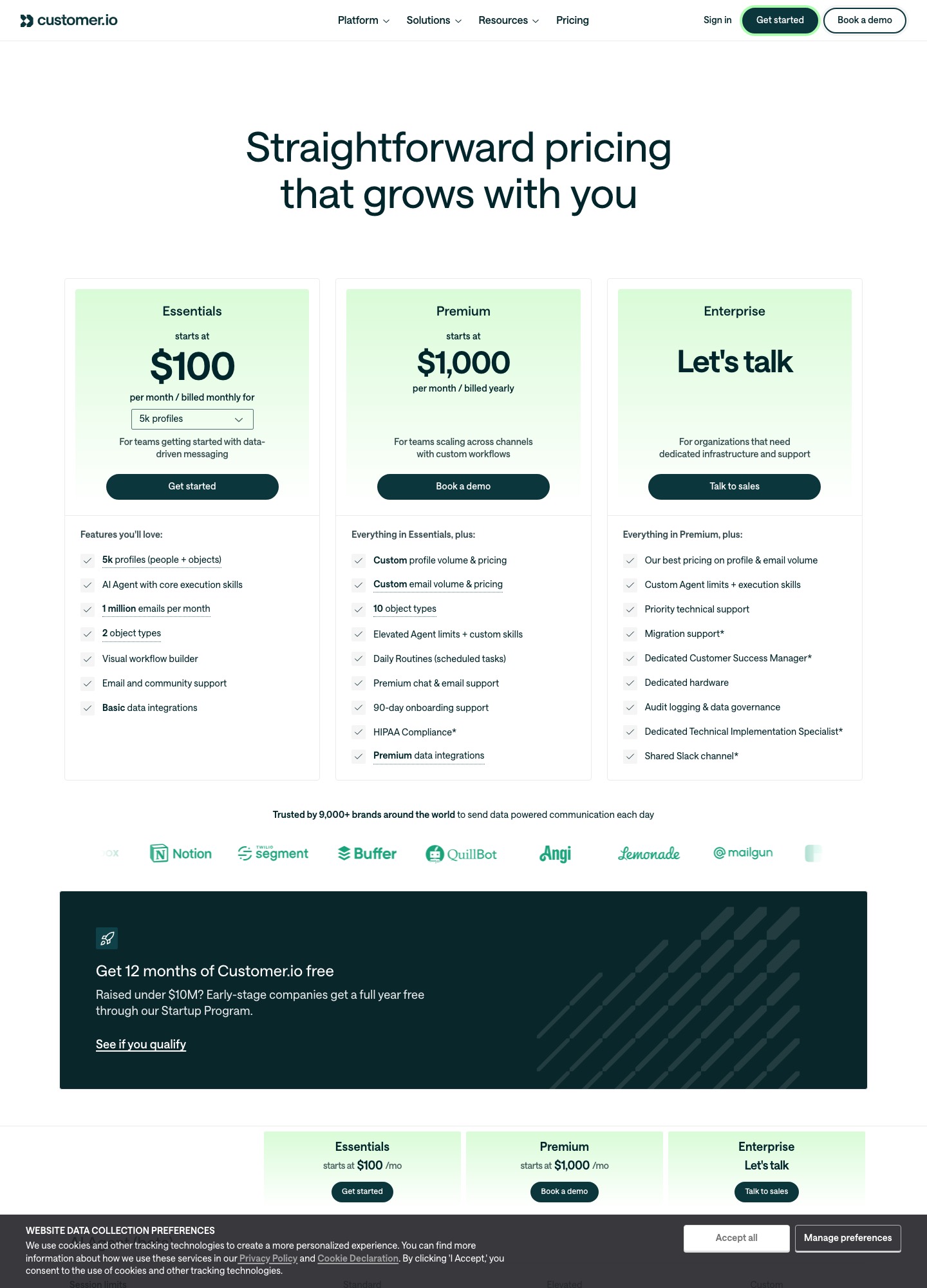
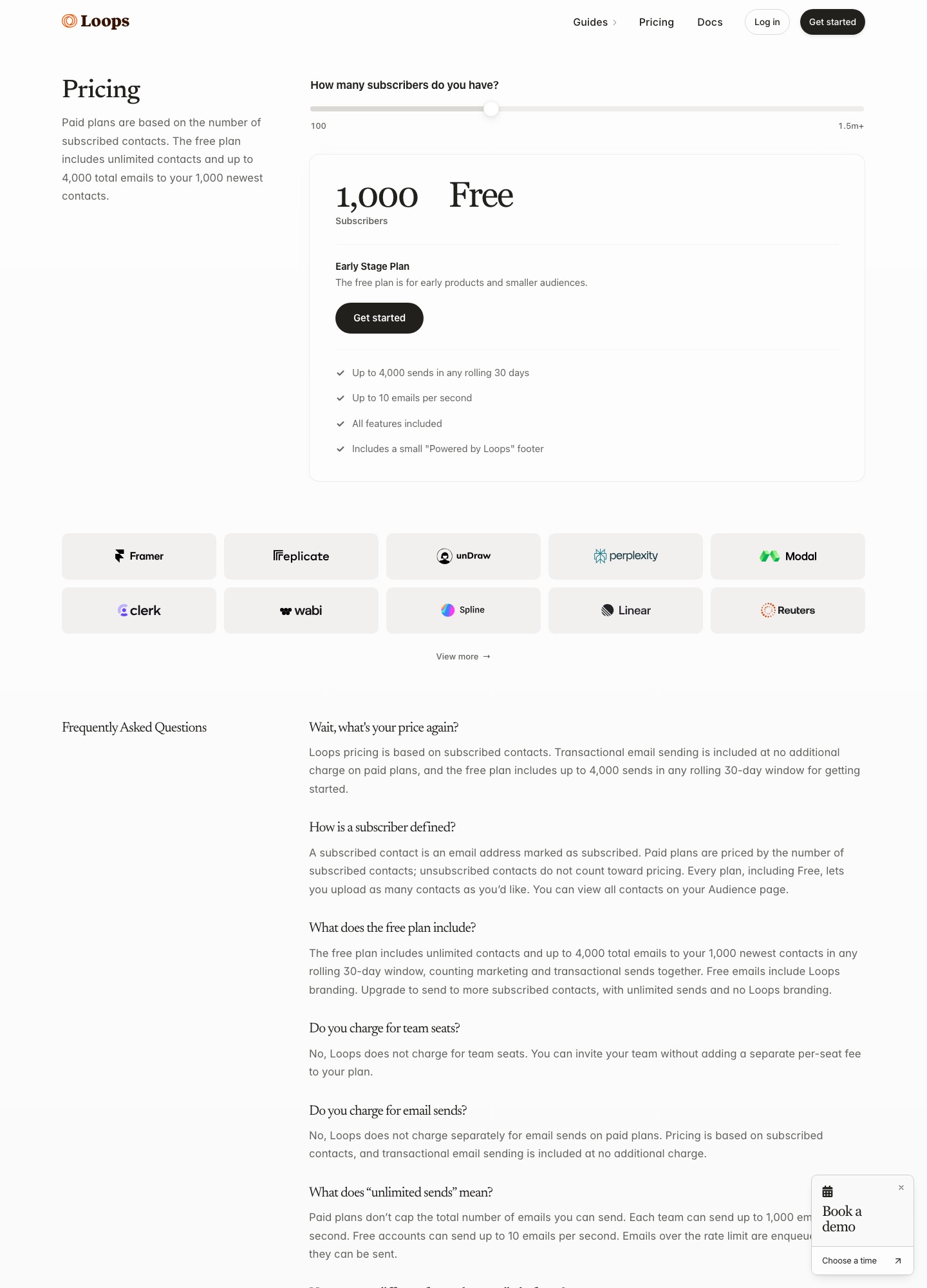
Pick Loops if a small team wants onboarding, activation and retention email without a lifecycle specialist: it is free up to the 1,000 newest contacts, then $99 a month at about 10,000 and $249 at about 50,000. Pick Customer.io if you need more than email (push, in-app, WhatsApp), custom objects, or segmentation that follows a rich data model: Essentials starts at $100 a month for 5k profiles, $145 at 10k and $505+ at 50k. At 50,000 people the gap is $256 a month.
Prices at a glance
| Plan | Customer.io | Loops |
|---|---|---|
| Free | No standing plan; Startup Program gives 12 months free to companies that raised under $10M | $0: up to 4,000 sends in any rolling 30 days to the 1,000 newest contacts, with a small footer |
| Entry paid | Essentials, $100 a month for 5k profiles | $99 a month at about 10,000 subscribers |
| At 10,000 | $145 a month | $99 a month |
| At 50,000 | $505+ a month | $249 a month |
| Billed by | Profiles (people and objects) | Subscribed contacts |
| Sends | 1 million emails a month included; $0.12 per extra 1,000 | Unlimited to subscribers on paid plans |
| Top tier | Premium from $1,000 a month, billed yearly | One paid plan that scales with contacts |
Customer.io figures are the profile selector readouts on its pricing page, billed monthly. Loops' figures are the slider readouts on its pricing page at 9,998 and 49,989 subscribers, read on October 7, 2026.
Two different pricing units
Customer.io counts profiles, and its Essentials listing defines them as "people + objects". An object here is a non-person record such as an account or a workspace, so a B2B product that models both its users and its customer accounts can pay for both. Essentials includes two object types and Premium ten. Extra profiles cost $0.009 each, and emails beyond the included million cost $0.12 per 1,000. From the 10k step onward the selector adds $90 for every further 10k profiles: $145, $235, $325, $415, then $505+ at 50k.
Loops counts subscribed contacts and then stops metering. Its pricing page says paid plans include unlimited sends to subscribers and transactional sends to users outside your audience, and that it does not charge for team seats. The free plan caps you at 4,000 sends per rolling 30 days to your 1,000 newest contacts and caps throughput at 10 emails per second. So for Loops the question is how big your audience is, and for Customer.io it is how big your audience is and how much data you attach to it.
What each costs at three list sizes
Take a SaaS product that emails every user about four times a month, so sends follow list size.
- 1,000 users, about 4,000 emails a month. Loops: $0, because that is exactly the free allowance of 4,000 sends in a rolling 30 days to the 1,000 newest contacts. Customer.io: $100 a month for the 5k-profile Essentials step, so $1,200 a year, unless you qualify for the Startup Program and take the free year.
- 10,000 users, about 40,000 emails a month. Loops: $99 a month, $1,188 a year. Customer.io: $145 a month, $1,740 a year, with email volume nowhere near the included million. The gap is $46 a month, or $552 a year.
- 50,000 users, about 200,000 emails a month. Loops: $249 a month, $2,988 a year. Customer.io: $505+ a month, $6,060+ a year. The gap is $256 a month, or $3,072 a year.
Send volume only matters to Customer.io when it passes a million. A product that mails 50,000 profiles thirty times a month sends 1.5 million emails: 500,000 above the allowance is 500 x $0.12 = $60, so about $565 a month. Loops does not change its price for the same traffic. On the other hand, if each person you track brings an account object with them, Customer.io's profile count can run above your user count, and Loops' contact count will not. Re-run these numbers with your own figures, because both vendors move their selectors.
Sending events from your app
Both platforms start with your product telling them what a user did. Loops puts that in one endpoint. This is the call from the Loops send-event reference:
curl --request POST \
  --url https://app.loops.so/api/v1/events/send \
  --header 'Authorization: Bearer <token>' \
  --header 'Content-Type: application/json' \
  --data '
{
  "email": "alex@company.com",
  "userId": "usr_7f8e9d0c1b2a",
  "eventName": "signup",
  "eventProperties": {
    "plan": "pro"
  },
  "mailingLists": {
    "clm2k8j4h6g0f8d6s4a2b0z8": true
  },
  "favoriteColor": "blue",
  "planName": "Pro"
}
'
You identify the contact with an email, a userId or both. When both are sent and one matches an existing contact, the other value is updated, and when neither matches, a new contact is created. Contact properties go at the root of the body, as with favoriteColor and planName here, and event properties travel in eventProperties. The docs say event property values can be a string, number, boolean or date, and that you must create the properties in Loops before using them in API calls. An Idempotency-Key header of up to 100 characters protects against duplicate emails, and the endpoint returns a 409 if the key was used in the previous 24 hours.
Customer.io's Track API uses HTTP basic authorization, serves US traffic from track.customer.io and EU traffic from track-eu.customer.io, and documents a rate limit of 1,000 requests per second. Event names can run to 100 bytes and event data to 100,000 bytes. The docs also explain that most people mean the v1 API when they say Track API, that the v2 API adds objects and batching, and that for direct integrations they suggest the Pipelines API. Its Node.js source is the usual starting point. Install @customerio/cdp-analytics-node, then:
import { Analytics } from '@customerio/cdp-analytics-node'
 // or, if you use require:
 const { Analytics } = require('@customerio/cdp-analytics-node')

 // instantiation
 const cioanalytics = new Analytics({
   writeKey: '<YOUR_API_KEY>'
   // if you're in our EU region
   // host: 'https://cdp-eu.customer.io',
 })
People are identified with their traits, and events are sent against the same user ID:
cioanalytics.identify({
  userId: '019mr8mf4r',
  traits: {
    name: 'Sid Singh',
    email: 'sid@example.com',
    plan: 'Enterprise',
    friends: 42
  }
});
cioanalytics.track({
userId: '019mr8mf4r',
event: 'added_to_cart',
properties: {
product: "shoes",
revenue: 39.95,
qty: 1,
size: 9
}
});Compare the two on the points that bite later. Customer.io's custom events page says event properties are nested JSON, including arrays and arrays of objects, which suits an order with line items. Loops event properties are flat typed values, so you flatten before you send. Customer.io separates identifying a person from tracking an event and can merge the last 30 days of anonymous activity when someone signs up. Loops folds both into one call, which is quicker to wire up but gives you fewer levers for pre-signup behaviour.
Segmentation and workflow depth
Loops workflows are built from six node types: trigger, email, timer, audience filter, branch and experiment. There are four triggers (contact added, contact updated, contact added to a mailing list, and event received) and the docs name signUp, canceled and activated as common custom events. Branches are defined by audience filters evaluated left to right, a contact follows the first match, and a contact that matches none exits the workflow. Branches can converge again on a shared timer, workflows cannot loop back on themselves, and each branch can hold more branches and experiments. For a welcome series that splits free from paid users and reconverges on a week-long wait, that is enough.
Customer.io's centre of gravity is its segment model. Segments are either data-driven, membership following attributes and behaviours automatically, or manual and static, and you can use them as recipient lists, automation triggers, filters and conversion criteria. A caveat from its docs shapes how you design them: a person counts as "not in" a segment both after leaving it and if they never belonged, so a flow meant for people who used to be in a segment needs extra conditions. If you have a CRM-style schema with accounts, plans, seats and usage events, this is where the higher price goes.
Transactional email
Loops lets you build a transactional email in its editor and send it by API to any address, and its pricing page states that transactional sending is included on paid plans at no extra charge. It also publishes SMTP guides for Django, Laravel and Rails, which helps when your framework already sends mail through a mailer class. Customer.io shows one email allowance per plan, so check how its transactional messages are counted before you move receipts and resets across. When most of your volume is transactional, price the dedicated senders on Loops vs Resend as well.
Who each one is wrong for
- Customer.io is wrong for a two-person team that wants three onboarding emails live this week. You pay $100 a month before sending anything, and journeys need event definitions, identity rules and suppression design.
- Loops is wrong for a product that needs push, in-app or WhatsApp in the same journey as email, or one that models accounts and other objects and wants to segment on them. Customer.io lists those channels and object types on its pricing page.
- Either is wrong for newsletter-first publishers or ecommerce stores whose main job is broadcasts and product feeds, where a dedicated tool does the work more cheaply.
Moving from one to the other
Moving Loops to Customer.io, export contacts with their properties, then rebuild each workflow as a journey by hand, because workflow logic does not move across on its own. Your app already sends events, so keep the event names and add the Customer.io identify and track calls alongside the Loops ones. Run both for a week with the sequences paused on one side, then cut over. Moving Customer.io to Loops, flatten nested event properties, create each property in Loops first, and decide what happens to object data, because the Loops docs list contacts, contact properties and mailing lists but no custom objects. In both directions, bring across unsubscribes and bounces before the first send.
For other pairings see Customer.io vs Drip, Userlist vs Customer.io and Loops vs Resend. The SaaS onboarding email guide covers what to put in the sequences once you pick, transactional vs marketing email explains why the two streams should stay separate, and email tools for lifecycle marketing lists the wider field.
FAQ
Why does Customer.io cost more than Loops at the same list size?
They sell different things. Customer.io lists Essentials at $145 a month for 10k profiles and $505+ for 50k, with 1 million emails included and extra emails at $0.12 per 1,000. Loops lists $99 at about 10,000 subscribers and $249 at about 50,000, with unlimited sends to subscribers. Customer.io's price buys a broader platform (push, in-app messaging, objects, an AI agent); Loops' price buys a narrower email-first tool. Compare the invoice only after deciding whether you need the extra surface.
Can I start on Loops and move to Customer.io later?
Yes, and it is a common path, but plan the move. Your contacts and their properties can be exported and imported, but workflow logic does not travel with them, so each Loops workflow has to be rebuilt as a Customer.io journey. Keep your event names stable in your own code, send the same events to both during an overlap, and move one low-risk sequence first. A new platform also needs your unsubscribed and suppressed addresses before the first send.
Is either one a transactional email service?
Loops says transactional sending is included at no additional charge on paid plans, and lets you send transactional emails to people outside your audience. Customer.io's pricing page shows email volume per plan (1 million emails a month on Essentials); read its docs on how transactional messages count against that figure before you route password resets through it. If transactional volume is the bulk of your traffic, a dedicated API sender such as Resend may be the cheaper tool.
Does Customer.io have a free plan?
Not as a standing plan. Its pricing page offers a Startup Program: early-stage companies that raised under $10M get a full year free. After that, Essentials starts at $100 a month billed monthly for 5k profiles. Loops has a permanent free tier covering up to 4,000 sends in any rolling 30 days to the 1,000 newest contacts, with a small Powered by Loops footer.
Which one handles complex segmentation better?
Customer.io has the deeper model. Its segments can be data-driven or manual and can be used as recipient lists, automation triggers, filters and conversion criteria, and it supports custom objects for non-person data (two object types on Essentials, ten on Premium per its pricing page). Loops filters contacts with audience filters and saved segments inside a simpler contact model, which is enough for most onboarding and retention flows.