Litmus vs Email on Acid: which email testing tool should you pay for?
By Mara Levin · Updated October 7, 2026 · Vendor pages checked that day
Both show you your email in 100+ clients before you send. The difference that matters in 2026 is that one prints its price and is being absorbed into Mailgun, while the other asks you to talk to sales.
The short answer
If you want a number you can put in a budget today, Email on Acid is the one: $99 a month for 1,000 previews, $199 for 2,000. But read the transition note before you sign an annual plan, because its subscriptions are moving to Mailgun Inspect. Choose Litmus if your team needs monitoring of live emails, collaboration and review around the tests, or integrations with enterprise marketing platforms, and you are ready to get a quote rather than a price list.
At a glance
| Question | Litmus | Email on Acid |
|---|---|---|
| Published price | None; pricing page is a contact form | Basic $99/mo, Premium $199/mo, Contract custom |
| Previews | 100+ email clients, dark mode included | 1,000 or 2,000 a month, 100+ clients and devices |
| Overage | Ask in your quote | $0.15 per preview |
| Spam testing | 25+ spam filters | Content spam checks on Premium |
| Live monitoring | Email Guardian, with alerts | Not listed on the pricing page |
| Users | Depends on contract | Unlimited on every tier |
| Owner and direction | Now part of Validity Engage | Transitioning to Mailgun Inspect from June 2026 |
What each one actually checks
Strip away the branding and both do the same core job: you give them HTML, and they return screenshots of how it looks in a long list of clients and devices. The two product pages describe the rest of their toolkits differently.
Litmus. Its email testing page describes previews in 100+ clients including dark mode, a QA checklist that checks links, images and tracking, accessibility checks for colour vision deficiency, spam testing across 25+ filters, and Email Guardian, which it calls unlimited 24/7 monitoring with an alert when an email client changes in a way that could affect your message. It also lists a Chrome extension, code-editor support (Dreamweaver, Visual Studio and Sublime Text by name) and ESP integrations for platforms such as Salesforce Marketing Cloud, Oracle Eloqua, Mailchimp, Adobe Marketo and Klaviyo.
Email on Acid. The pricing page lists previews in 100+ clients and devices and API access on both paid tiers. Premium adds accessibility tests, HTML code analysis, link and image validation and content spam checks. Every tier includes unlimited user seats, which is unusual in this category and makes it friendlier to agencies where many people need to look at a result.
How Email on Acid counts previews, with arithmetic
The pricing unit is the preview, and Email on Acid's FAQ defines it: each screenshot of an individual device or client counts as one, so a single test over 50 clients and devices is 50 previews. Link validation, accessibility tests and spam checks are not counted against the allowance. That makes monthly cost depend on your habits more than on your list size. Three worked examples, with numbers that are mine, not the vendor's:
- A weekly newsletter, one template: four sends a month, three rounds of fixes each, 50 clients per round is 4 × 3 × 50 = 600 previews. Basic ($99, 1,000 previews) covers it with room to spare.
- A small agency, ten active templates: ten templates, four rounds each, 50 clients is 2,000 previews, which is exactly the Premium allowance at $199. On Basic the same work needs 1,000 extra previews at $0.15, or $150, so the bill would be $249 and Premium is cheaper.
- One heavy launch: a campaign with 6 variants tested across all 100 clients is 600 previews in one go. Run it twice and you have used 1,200, so Basic would add 200 × $0.15 = $30 on top of $99.
The practical rule is to pick a short list of must-pass clients (the ones your own list actually opens on) and test those during the build, then run the wide 100-client sweep once before sending. Our client compatibility guide covers how to choose that list.
What to know about Litmus pricing
Litmus's pricing page is no longer a table of plans. When I opened it on October 7, 2026, it carried a banner saying Litmus is now part of Validity Engage and a form that asks for name, company, email, phone and country. That is a sales path, not a price. It does not mean Litmus is expensive, only that you cannot compare it line by line before talking to someone.
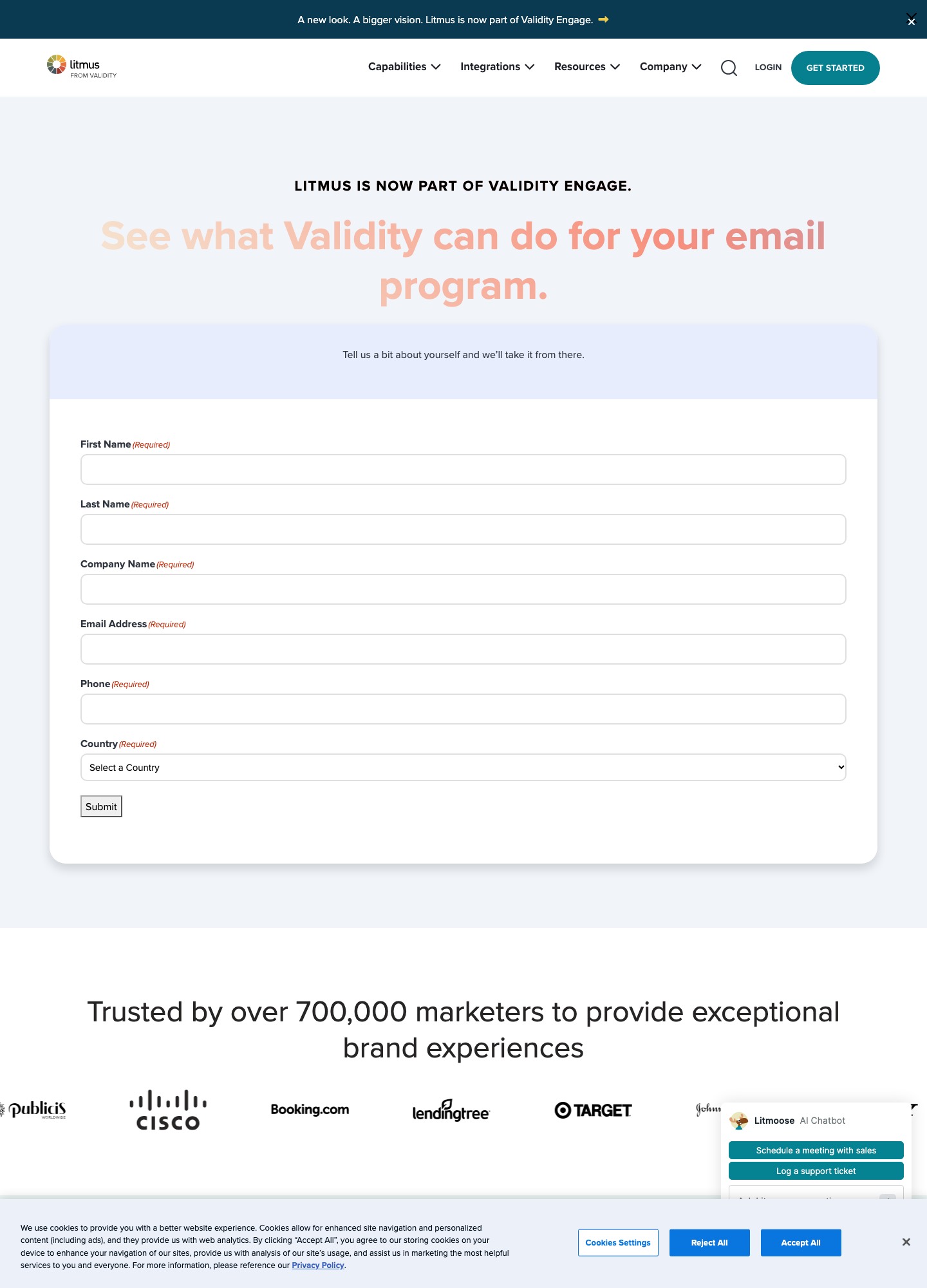
Questions worth putting in the quote request: how many previews or tests are included, whether Email Guardian monitoring is in the base price, how many seats you get, and what the renewal uplift is. Ask for these in writing. Then you can set the answer next to $99 and $199 and decide whether the extra features justify the difference.
The Mailgun Inspect transition
Email on Acid's pricing page now opens with a note that its previews and QA tools are part of Mailgun Inspect, and the FAQ spells out what happens. Beginning in June 2026, current subscribers start transitioning. Annual plans migrate at the end of the current term. Existing previews and tests are not transferred, and a special migration discount is promised with details to follow. Mailgun Inspect can be used with any email service provider, and sending still needs a separate service such as Mailgun Send. For the sender side of that company, see SendGrid vs Mailgun.
For a buyer this changes the maths in two ways. A one-year commitment today may be a commitment to a renamed product by the time it renews, so ask what the migration discount is before you sign. And if you already use Mailgun for sending, having the testing tool in the same account is a convenience; if you do not, it is irrelevant.
Choose Litmus if…
- Your emails go out through a large enterprise platform and you want testing inside that workflow, through an integration or the Chrome extension.
- You want something watching sent emails for client changes, which is what Email Guardian is described as doing.
- Review, approvals and collaboration around a campaign matter as much as the screenshots, and a sales conversation is normal for your procurement.
Choose Email on Acid (or Mailgun Inspect) if…
- You need a price you can approve this week and unlimited seats for a mixed team.
- Your testing volume is predictable enough to fit inside 1,000 or 2,000 previews a month.
- Pre-send checks (accessibility, links, images, spam content) matter more to you than live monitoring.
- You build with a framework such as Maizzle or MJML and just need a place to look at the finished HTML. Maizzle's own docs name Email on Acid and Litmus as the kind of tools to run render tests with.
Cheaper ways to cover part of the job
Some builders include previews, so you may not need a dedicated tool for every email. Mailjet's pricing page, for example, lists email previews on some plans, which we covered in MJML vs React Email. A framework's dev checks (Maizzle uses caniemail.com data) catch unsupported CSS early. A dedicated preview service is then for the final sweep, not for every edit.
FAQ
Is Email on Acid shutting down?
Not in the sense of disappearing, but it is being folded into another product. Email on Acid's pricing page says its previews and QA tools are now part of Mailgun Inspect, and that from June 2026 current subscribers start transitioning. Customers on annual plans move at the end of their current term, and existing previews and tests are not carried over, so export anything you need before your date.
How many previews does one test use?
One per client or device screenshot. Email on Acid's FAQ gives the example that a single test across 50 clients and devices counts as 50 previews. Link validation, accessibility tests and spam checks do not draw from that allowance. A 1,000-preview plan is therefore about 20 full 50-client runs a month.
Does Litmus publish its prices?
Not as a plan table that I could find. Its pricing page, captured above, is a contact form headed with a note that Litmus is now part of Validity Engage, and the "Get started" links on its testing page lead to a contact-sales form. If you need a number for a budget, ask for a quote in writing and compare it to the Email on Acid figures on this page.
Can I use either one if I send with Mailchimp, Klaviyo or HubSpot?
Yes. Litmus lists integrations and a Chrome extension for Mailchimp and Klaviyo among others, and Email on Acid's successor, Mailgun Inspect, is described as usable with any email service provider. Neither needs you to send through its owner. Both test the HTML you paste or sync in, so the sender does not matter for the preview.