Stripo alternatives: who should switch, and to what
By Mara Levin · Updated October 7, 2026 · Prices and docs checked that day
The closest visual replacement is Beefree, whose Professional plan is listed at $30 a month. Teams that write HTML are better served by Parcel at $29 per user, or by the MJML and Maizzle frameworks. Embedding an editor in your own product points to Unlayer or Topol.
The short answer
Leave Stripo for Beefree if you want the same kind of drag-and-drop editor with different plan limits, for Parcel if your team is comfortable in code and wants previews and checks around it, and for Unlayer or Topol if the editor has to live inside your own application. Stay put if one or two people send fewer than 50 exports a month: Stripo Basic costs $20, the lowest-priced paid plan in this comparison for that job, and the free tiers elsewhere cap at 6 exports or 50 emails.
What Stripo charges today
Stripo lists four plans on its pricing page. The limits matter more than the prices, because they decide when a team outgrows a plan.
| Plan | Monthly | Yearly | Members | Exports a month | Test emails a day | Stored emails |
|---|---|---|---|---|---|---|
| Free | $0 | $0 | 2 | 4 | 5 | 10 |
| Basic | $20 | $200 | 2 | 50 | 50 | 50 |
| Medium | $45 | $450 | 3 | 300 | 100 | 300 |
| Pro | $125 | $1,250 | 10 | 4,000 | 300 | 5,000 |
Stripo marks the yearly option "Pay yearly (Save 20%)". Here are the figures behind that label. Basic is $200 against 12 x $20 = $240 monthly, a $40 saving. Medium is $450 against 12 x $45 = $540, a $90 saving. Pro is $1,250 against 12 x $125 = $1,500, a $250 saving. Each saving is 20% of the yearly price but 16.7% of what you would pay month by month, so budget from the dollar amounts and not from the label.
Stripo's own pricing FAQ is candid about the Free plan: it suits you if you want to build templates and do not plan to export emails to ESPs, invite colleagues, preview how an email renders in clients and on devices, or send test emails to any address other than your own. Free is a trial of the editor, not a production workflow.
Where Stripo's plans pinch
- Seats. Free and Basic include 2 members, Medium 3 and Pro 10. Adding a fourth person moves a team from $45 to $125 a month, an $80 step, even if their export volume is unchanged.
- Exports. The allowance runs 4, 50, 300 and 4,000 a month. The pricing page does not define what counts as one export in the text, so read that definition before sizing. If every push to an ESP or HTML download counts, a team that revises each campaign several times will use a 50-export plan faster than its campaign count suggests.
- Stored emails. Free keeps 10, Basic 50, Medium 300 and Pro 5,000. A reusable template library crosses 10 quickly.
- Builder only. Stripo designs and exports; it does not send. People who want one tool for both jobs usually end up in a sender's own editor, which is a different decision from picking another builder.
The alternatives, with prices from each vendor's page
| Tool | What it is | Prices listed | Pick it when |
|---|---|---|---|
| Beefree | Visual drag-and-drop editor | Starter $0; Professional $30 a month; Business $160 a month | You want the nearest like-for-like visual editor |
| Parcel | Code-first editor with previews and checks | Community $0; Pro $29 per user a month; Business $56 per user a month | Your team writes HTML and wants guardrails |
| Topol | Visual editor; pricing page opens on its plugin plans | $70, $140 and $300 a month by prepaid users | An editor must sit inside your product |
| Unlayer | Embeddable email, page and popup builders | Free $0; Launch $250, Scale $750, Optimize $2,000 a month | You embed at higher volume and want brand controls |
| Chamaileon | Shared modules and design system for larger teams | From $4k a year or $400 a month | Many people share one governed library |
| MJML | Open-source markup language | MIT licence, no plans | Developers keep templates in git |
| Maizzle | Framework for Vue and Tailwind CSS | No plan prices on its site | Your team already writes Vue and Tailwind |
| React Email | React components for email | MIT licence, free | Your product is a React application |
Beefree: the closest visual match
Beefree's pricing page lists Starter at $0 (up to 10 designs, 6 exports a month), Professional at $30 a month and Business at $160 a month, plus a custom Enterprise tier. Professional is described as "for the one-person team", with unlimited project folders and reusable content blocks and room for "1 other seat". Business adds advanced brand controls, 2 organized workspaces, built-in approval workflows and a QA assistant. One naming wrinkle: the pricing page is titled RGE Studio Pricing and its FAQ says "RGE Studio (formerly Beefree)", so do not be thrown if the vendor's own page uses the new name.
Beefree's FAQ sets expectations that carry over from Stripo: it is a creation environment, and sending, automation and data stay in your ESP or CRM. ESP-native personalization strings are not rendered live in the builder, though merge tags, display conditions and custom code blocks are supported. It also mentions an HTML importer, which matters when you are moving a library.
Parcel: for teams that code their emails
Parcel's pricing page describes Community ($0) as "for anyone who codes emails" with 50 emails, HTML problem checking, test sends, previews and accessibility testing. Pro is $29 per user per month with unlimited emails, 5 workspaces, custom components and link and image validation. Business is $56 per user per month and adds approvals and feedback, SpamAssassin scanning, unlimited workspaces and PDF exports. Because the price is per user, Parcel rewards small teams and penalises large ones, as the cost examples below show. Community's 50-email cap makes it an evaluation tier.
Topol: priced as a plugin, with a free trial
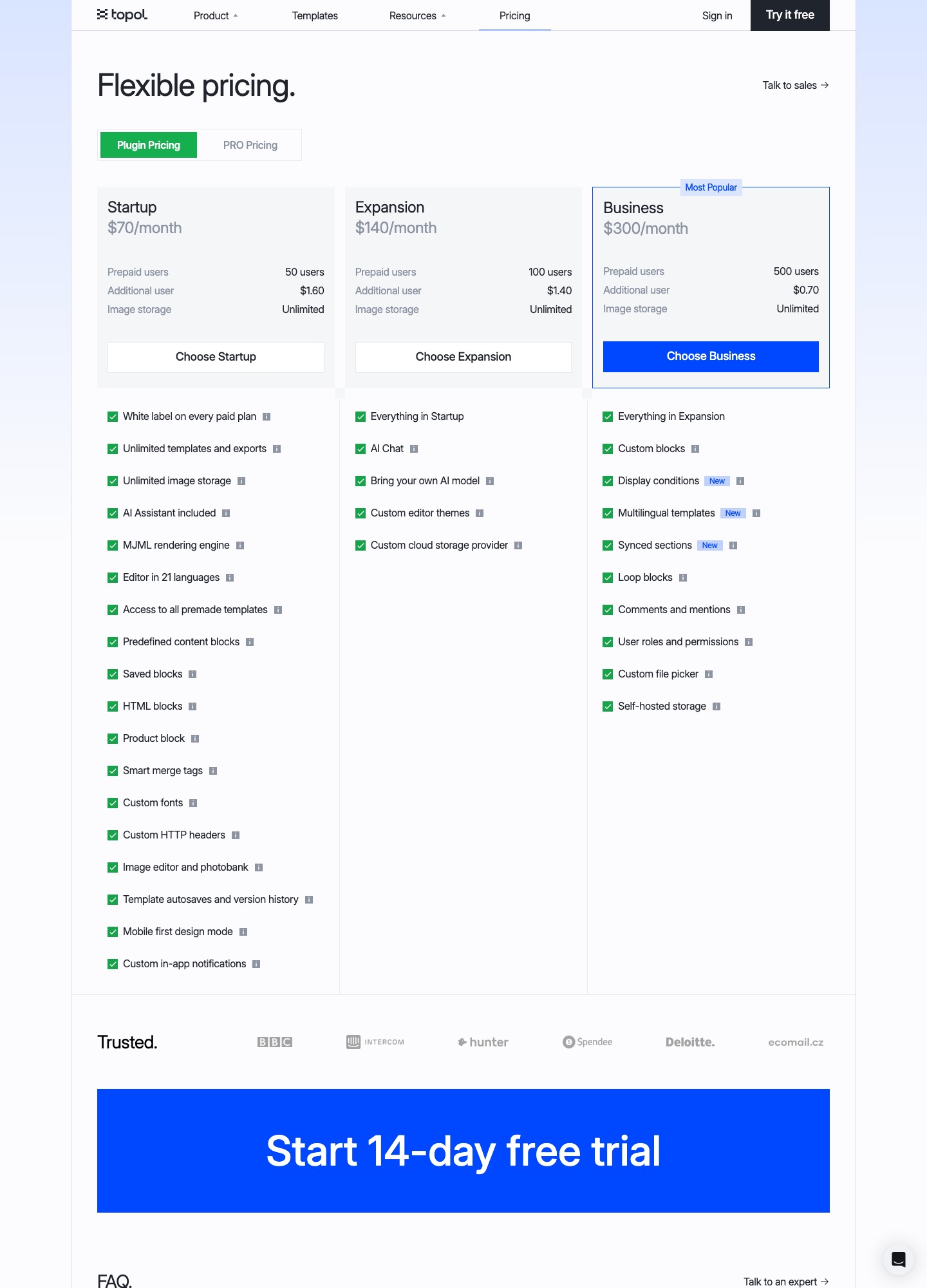
Topol's pricing page opens on its Plugin Pricing tab: Startup at $70 a month with 50 prepaid users, Expansion at $140 with 100, and Business at $300 with 500. Additional users cost $1.60, $1.40 and $0.70 respectively, and every paid plan is white-labelled with unlimited image storage. The feature list names an "MJML rendering engine", so templates compile through the open MJML standard and stay portable. A second tab, PRO Pricing, covers the standalone editor; read its figures on the page before you compare, because they are a different product from the plugin plans quoted here.
Unlayer: an embedded builder with bandwidth tiers
Unlayer's pricing page lists a $0 forever-free plan for the email, page, popup and document builders, then Launch at $250 a month, Scale at $750 and Optimize at $2,000, each with a 14-day trial and 1 TB of bandwidth. Client previews across 90+ email clients are an add-on available from Scale upward. These plans are built for a software company that puts a builder in front of its own customers; a marketing team that only designs newsletters would pay for capabilities it never uses.
Chamaileon: governed modules for bigger teams
Chamaileon's pricing page starts at $4k a year or $400 a month and lists no free plan. The price includes tailored onboarding, email design system setup and round-the-clock support. At $400 a month it only makes sense when several people share one library of approved modules and someone owns those blocks; for one designer, Stripo at $20 or $45 is a far lighter fit.
MJML, Maizzle and React Email: the code route
If the reason for leaving is that templates should live in a repository, the options are frameworks rather than editors. MJML's FAQ states an MIT licence, and React Email's repository says the same. Maizzle describes itself as a framework for HTML email built on Vue and Tailwind CSS and shows no plan prices. None of the three has a visual canvas for marketers, so the saving is real only if developers own the templates. Our MJML alternatives page covers who leaves that stack and where they go, and Maizzle vs MJML compares the two frameworks directly.
When the real goal is not a builder at all
Some searches for a Stripo alternative are really about sending. Mailchimp, Campaign Monitor, Klaviyo, HubSpot and EmailOctopus bundle an editor with audiences and sending, which removes the export step and ties your templates to that platform's fields. Klaviyo and HubSpot fit when content depends on catalog or CRM data. Designmodo Postcards is a module-driven design tool in Stripo's own family; see Postcards vs Stripo. None is priced here, because their plans scale with contacts rather than editor seats.
Three worked cost examples
A freelancer exporting about 30 emails a month
Stripo Basic covers 50 exports for $20 a month, or $200 a year. Parcel Pro for one user is $29 a month and Beefree Professional is $30 a month. For this profile Stripo is $9 to $10 a month cheaper than either, so the only reason to move is a feature the others offer, not cost.
An in-house team of four
Stripo's Medium plan stops at 3 members, so four people means Pro at $125 a month. Parcel Pro for four users is 4 x $29 = $116, nine dollars below Stripo, and Parcel Business with approvals is 4 x $56 = $224. Beefree's Professional plan has room for two people, so four would start at Business at $160; Beefree's page does not state a seat count for Business in the text, so confirm it before budgeting. At five people Parcel Pro is 5 x $29 = $145, which is already above Stripo Pro, and at ten it is $290 against Stripo's $125. Per-user pricing only wins for very small teams, so stay on Stripo past four seats.
A SaaS product embedding an editor
Topol counts prepaid users. With 120 users, Startup costs $70 + 70 x $1.60 = $182 a month, and Expansion costs $140 + 20 x $1.40 = $168, so the middle plan is cheaper. With 500 users, Expansion would be $140 + 400 x $1.40 = $700 while Business is a flat $300. Unlayer meters differently: Launch is $250 a month with 1 TB of bandwidth, whatever your user count. Which is cheaper depends on how your users are defined and how many assets they serve, so price both against your own numbers.
Migration: what moves and what you rebuild
- Pull the HTML first. Stripo's integrations page lists downloading emails as PDF, images or HTML files, pushing to 90+ ESPs and exporting to any CRM through Zapier or a webhook. Do this while you are still on a paid plan. Free lists only 4 exports a month and "limited" export options, so downgrading before you leave can leave templates stranded.
- Accept that structure does not travel. Exported HTML renders anywhere, but the editable modules do not. Beefree has an HTML importer, Parcel is an HTML editor so pasting works, and MJML or Maizzle mean a rewrite rather than a conversion.
- Check the connector for your ESP. Stripo names Mailchimp, SendGrid, Brevo, Klaviyo and Postmark among many. Beefree names Salesforce Marketing Cloud, Pardot and HubSpot for one-click push and says Klaviyo and similar platforms take a clean HTML export. If your ESP is not on the new tool's list, the route is a manual paste.
- Re-test merge tags and the unsubscribe link. Both are ESP-specific. A rebuilt template that looks identical can still break personalization or compliance.
- Pilot with one complicated email. Rebuild a template with columns and a conditional block, send it through your real ESP, and compare it to the Stripo original in the clients your list uses.
For deeper background on what to look for in the output, read the HTML email builder guide, and for the two-way matchups see Stripo vs Beefree and Topol vs Stripo.
FAQ
Is there a free Stripo alternative?
Several have a free entry point, each with a different limit. Beefree's Starter plan is $0 for up to 10 designs and 6 exports a month, Parcel's Community plan is $0 for 50 emails, and Unlayer lists a $0 forever-free plan. MJML and Maizzle have no plan fees at all, but you pay in developer time instead.
Does Stripo's yearly plan really save 20%?
Stripo labels the yearly option "Save 20%". The Basic plan is $200 a year against $240 for twelve monthly payments, a $40 saving, which is 16.7% of the monthly total and 20% of the yearly price. The label is accurate only if you measure the saving against the yearly figure.
Which alternative can I embed inside my own product?
Unlayer and Topol both publish plans for embedding. Unlayer lists Launch at $250 a month, Scale at $750 and Optimize at $2,000, each with 1 TB of bandwidth. Topol's Plugin Pricing tab lists $70, $140 and $300 a month based on prepaid users. Beefree, Parcel and Chamaileon are used by the people who write the emails rather than embedded in an application.
Can I take my Stripo templates with me?
As finished HTML, yes: Stripo's integrations page lists downloading emails as HTML files, and any email already pushed to an ESP lives there as HTML too. What does not travel is the editable module structure, so expect to rebuild templates in the new tool, or paste the HTML into a code-first editor such as Parcel.