Stripo vs BEE Free: what the free plans stop you doing, and what the first upgrade costs
By Mara Levin · Updated October 7, 2026 · Vendor pages and prices checked that day
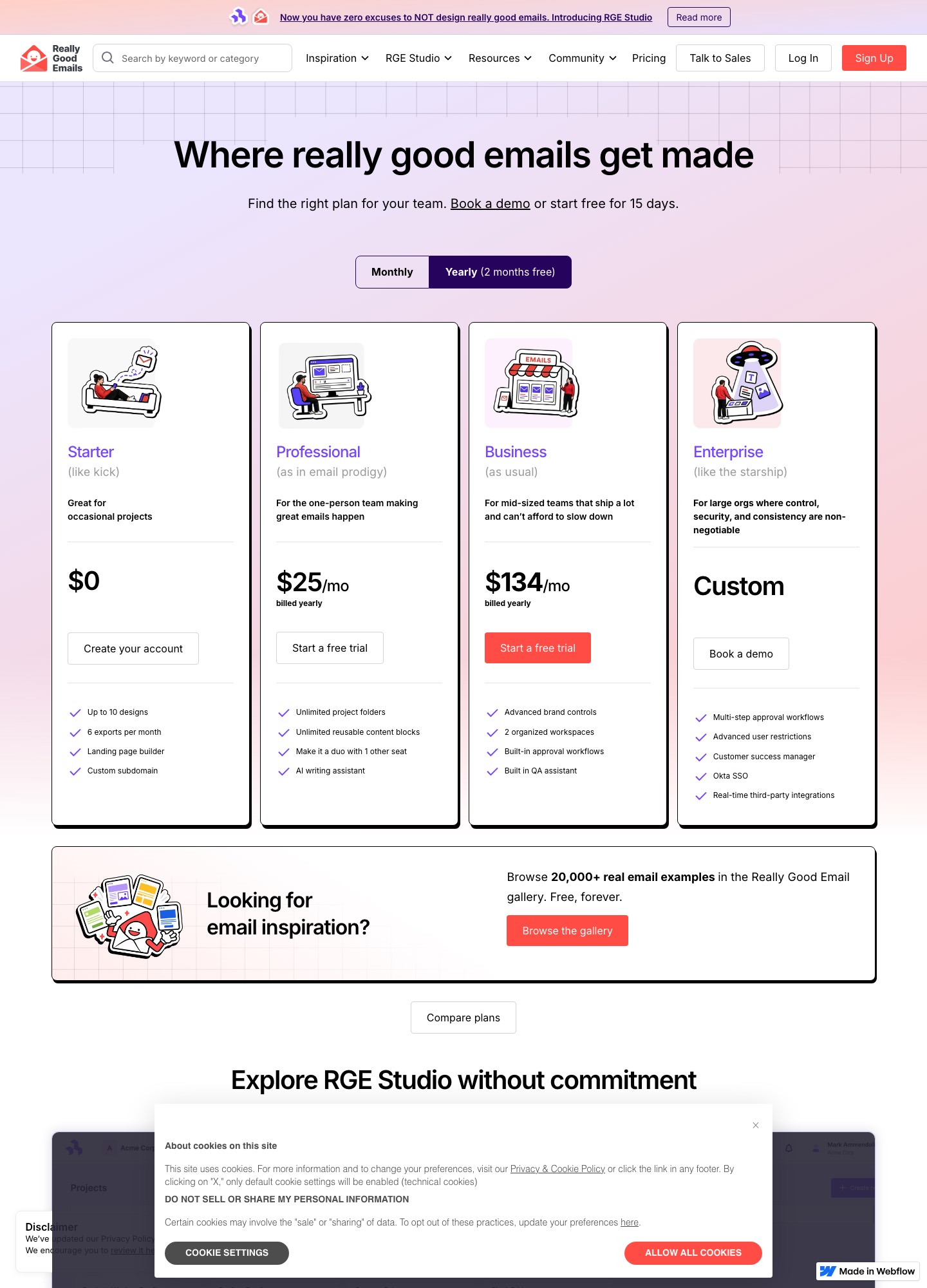
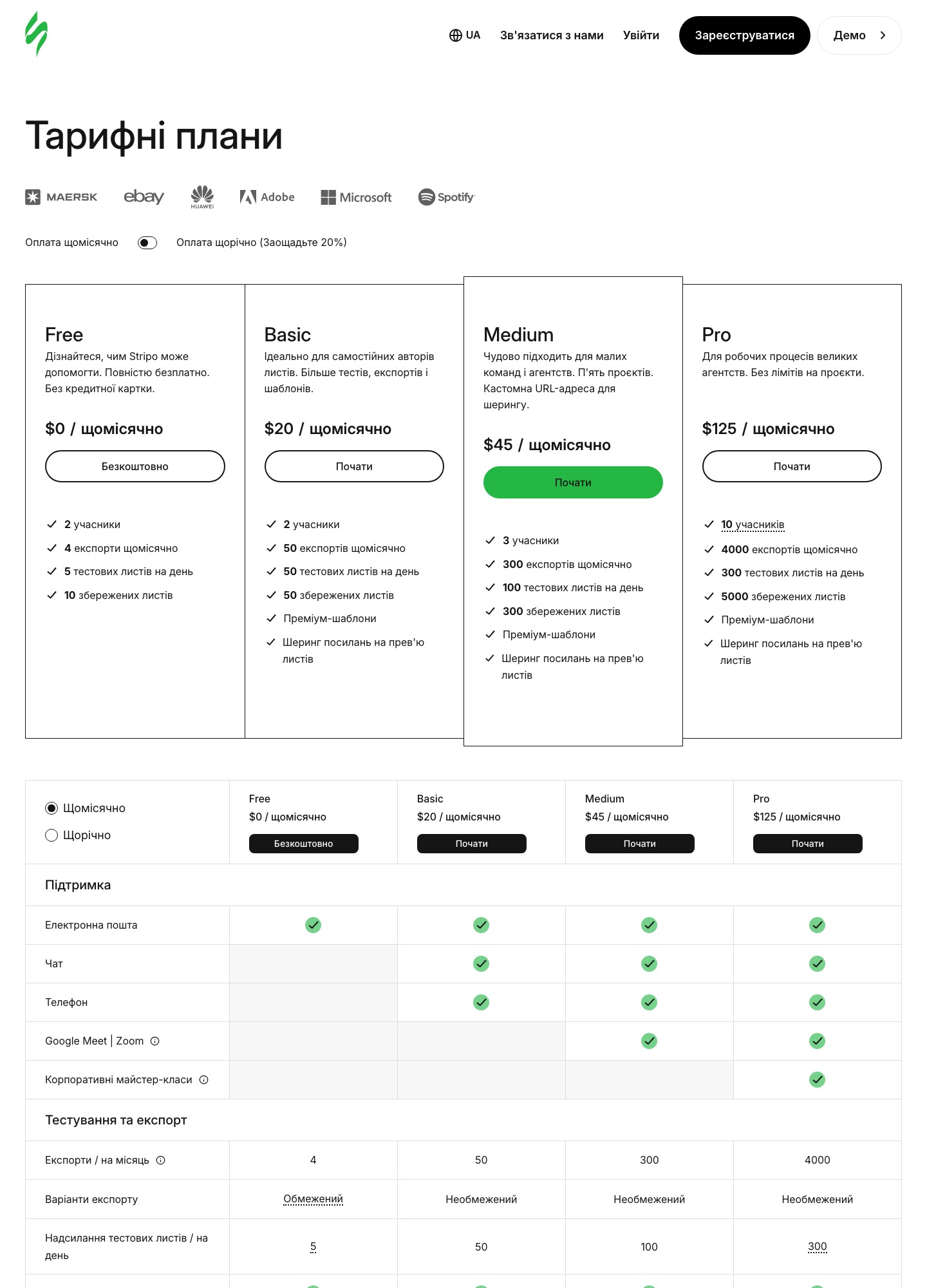
Both tools are builders, not senders, and both give away a small plan: Stripo Free (4 exports a month) and Beefree Starter (6). The useful comparison is the step after that: Stripo Basic at $20 a month against Beefree Professional at $30 ($25 billed yearly), and the much bigger jump to Beefree Business at $160 when you need approvals.
The short answer
For one or two people who export a dozen emails a month, Stripo Basic is the cheaper paid plan and carries 50 exports. Choose Beefree when its one-click ESP push on every plan, its HTML importer or its approval workflows decide the question, and accept that the approval tier costs $160 a month ($134 billed yearly). If your sender already has a decent editor and you send occasionally, Beefree's own FAQ admits you may not need either.
At a glance
| Question | Stripo | Beefree (RGE Studio) |
|---|---|---|
| Free plan | $0: 2 members, 4 exports a month, 5 test emails a day, 10 stored emails | Starter $0: up to 10 designs, 6 exports a month, landing page builder, custom subdomain |
| First paid plan | Basic $20 a month or $200 a year: 2 members, 50 exports, 50 stored emails, premium templates, preview links | Professional $30 a month, $25 billed yearly: unlimited folders and reusable blocks, one extra seat, AI writing assistant |
| Middle plan | Medium $45 or $450 a year: 3 members, 300 exports, 300 stored emails | Business $160 a month, $134 billed yearly: brand controls, 2 workspaces, approval workflows, QA assistant |
| Top plan | Pro $125 or $1,250 a year: 10 members, 4,000 exports, 5,000 stored emails | Enterprise, priced on request |
| Trial | Free plan has no time limit | 15 days on the Business plan |
Sources: stripo.email/pricing and beefree.io/pricing, read on October 7, 2026. Stripo shows "Pay yearly (Save 20%)"; the yearly totals above are the ones its page displays.
What each free plan is really for
Free plans in this category are shop windows, and the two vendors say so in different ways. Stripo's pricing FAQ spells out that Free suits you if you want to build email templates and do not plan to export to ESPs, invite colleagues, preview how an email renders in clients and on devices, or send test emails to any address other than yours. That is most of a working workflow, so treat Stripo Free as a place to learn the editor, not to run a newsletter.
Beefree is looser. Starter lists up to 10 designs, 6 exports a month and a landing page builder, with version history kept for the last two versions and only a couple of saved reusable blocks. Its Mailchimp integration page states that one-click push to your sending platform is available for all RGE Studio plans, so a Starter user can in principle push a finished email to a connected ESP. The six-exports cap on its pricing table is listed against ZIP downloads and pasted HTML, and the table gives no separate count for connector pushes, so ask support how pushes are metered before you rely on it.
A practical test: take one real template and one real campaign. If you would need more than four revisions exported to an ESP in a month, Stripo Free is already too small. If you would need more than six, Beefree Starter is too.
The first upgrade: $20 or $30
Take a freelancer who maintains emails for three clients and exports about 12 a month. Stripo Basic covers that with 50 exports, at $20 monthly or $200 if paid yearly, which is $16.67 a month. Beefree Professional covers it too, at $30 monthly or $25 billed yearly, $300 over the year. Comparing like with like, month-to-month is $10 apart ($120 a year) and yearly is $100 apart.
Seats are alike at this level. Stripo Basic lists 2 members, and Beefree's Professional card says "make it a duo with 1 other seat". What differs is what the money buys beyond that. Stripo Basic adds premium templates and sharable preview links, plus 50 test emails a day. Beefree Professional adds unlimited project folders, unlimited reusable content blocks and an AI writing assistant. A designer who keeps hundreds of saved blocks gets more from the Beefree plan; a marketer who wants a client to approve by link gets it more cheaply from Stripo.
When Beefree's price jump makes sense
Beefree Business at $160 a month ($134 billed yearly) is where the tool turns into a workflow product: advanced brand controls, two workspaces, built-in approval workflows and a QA assistant. The Stripo pricing page I read lists no approval-workflow feature at all. Its nearest step up is Medium at $45 for three members and 300 exports, so the gap is $115 a month on monthly billing. For a team where one person drafts, another proofreads and a manager signs off, the approval workflow is what you are buying, and the comparison is Beefree Business against the time lost to forwarding preview links by email.
Beefree's own FAQ pitches the dedicated builder at design-heavy teams and agencies and describes locked rows and synced content blocks for legally required footers. It also states the limit candidly: small teams that send occasionally may find their ESP alone is enough. We would take that advice seriously before paying for either tool at $160.
Getting the HTML to your sender
Stripo's integrations page names Mailchimp, SendGrid, Brevo, Klaviyo, Campaign Monitor, HubSpot, Amazon SES and many more, and offers Zapier or webhook for CRMs plus downloads as HTML, PDF or image. Beefree's integrations page lists Salesforce Marketing Cloud, Pardot, HubSpot, Mailchimp, Klaviyo, Campaign Monitor, Brevo and SendGrid among native connectors, with a Custom Connector for anything else. If your sender is one of the big names, both will do. The longer tail favors Stripo.
One caveat belongs to Beefree, and it applies to any tool that designs outside the ESP. Beefree's FAQ says ESP-native personalization, such as Salesforce strings or Pardot variable tags, is not rendered live in the builder. You build with merge tags, display conditions and custom code blocks, and the personalization resolves once the email lands in the ESP. Plan a test send from the real sender before you hand the template to a client. Our HTML email builder guide explains how to run that check.
Testing before you send
Stripo's homepage advertises previews, test sends and testing with Email on Acid across 98 mobile, desktop and web clients; which client count and test-email limits you get depends on the plan, and the Free plan excludes previews. Beefree lists a QA assistant on Business and "Smart Check" in its comparison table. Neither replaces a render test of your actual final HTML in your actual sender, which is the point where Outlook usually shows its differences.
Choose Stripo if…
- You export a lot and want a high cap without a big price step: 50, 300 or 4,000 a month at $20, $45 and $125.
- You want a code editor beside the visual canvas, a big module library and a long list of ESP connectors.
- You need two or three seats and sharable preview links without paying for an approval product.
Choose Beefree if…
- Approvals, locked brand elements and separate workspaces are on your requirements list, and $134 to $160 a month is affordable for the team.
- You want an HTML importer so existing templates can be brought in without rebuilding.
- You value one-click push to your sender on every plan, including the free one.
Moving between them
Both export HTML, so a finished email can travel. Beefree's FAQ says its HTML importer brings existing designs into the builder without a rebuild, so Stripo's output has a path in. Going the other way means rebuilding in Stripo's modules, as its pages describe building rather than uploading. Whichever way you go, keep the old plan for one billing cycle so trigger emails already living in your ESP can still be edited at the source. For the wider field see Stripo alternatives, Topol vs Stripo and Mailchimp vs Beefree; French readers can use the French version of this comparison, written separately.
FAQ
Is BEE Free still a thing, or has it been renamed?
The old free tier lives on as the Starter plan at $0. Beefree's pricing page now carries the RGE Studio name, and its FAQ describes the product as "RGE Studio (formerly Beefree)". Starter allows up to 10 designs and 6 exports a month. If you searched for "BEE Free" and landed on a page about RGE Studio, you are in the right place.
Can I send my emails from Stripo or Beefree?
No, both are creation tools. Beefree's FAQ says it is "purely a creation environment, not an email marketing system", and Stripo exports to your sender instead of sending to your list. Stripo lists 90+ ESPs on its integrations page; Beefree names native connectors for Salesforce Marketing Cloud, Pardot, HubSpot, Mailchimp, Klaviyo, Campaign Monitor, Brevo, SendGrid and others, plus a Custom Connector and ZIP or pasted HTML.
Which free plan is better for a one-person business?
Beefree Starter gives slightly more headroom (6 exports and 10 designs against 4 exports and 10 stored emails), and Beefree says its one-click push to ESPs is available on all plans. Stripo says its Free plan is meant for building templates when you do not plan to export to ESPs, invite colleagues or send tests to other addresses. For a business that sends every week, neither free plan is a stable home; both are for trying the editor.
Do I need a standalone builder if my ESP already has an editor?
Often not. Beefree's own FAQ says small teams that send occasionally may find their ESP alone is enough. A separate builder starts to pay for itself when several people produce emails, when the same design has to move between senders, or when you want approvals and brand controls that your ESP's editor lacks.