Sequenzy vs Unlayer: a sender for your mail, an editor for your customers' mail
By Mara Levin · Updated October 7, 2026 · Vendor pages and prices checked that day
Unlayer is a drag-and-drop editor that software companies embed inside their own product, so the product's users can design emails, pages, popups and documents. Sequenzy is a platform a company uses to send its own email to its own users. Comparing them is a category question: are you building email features into a product, or are you mailing the people who use it?
The short answer
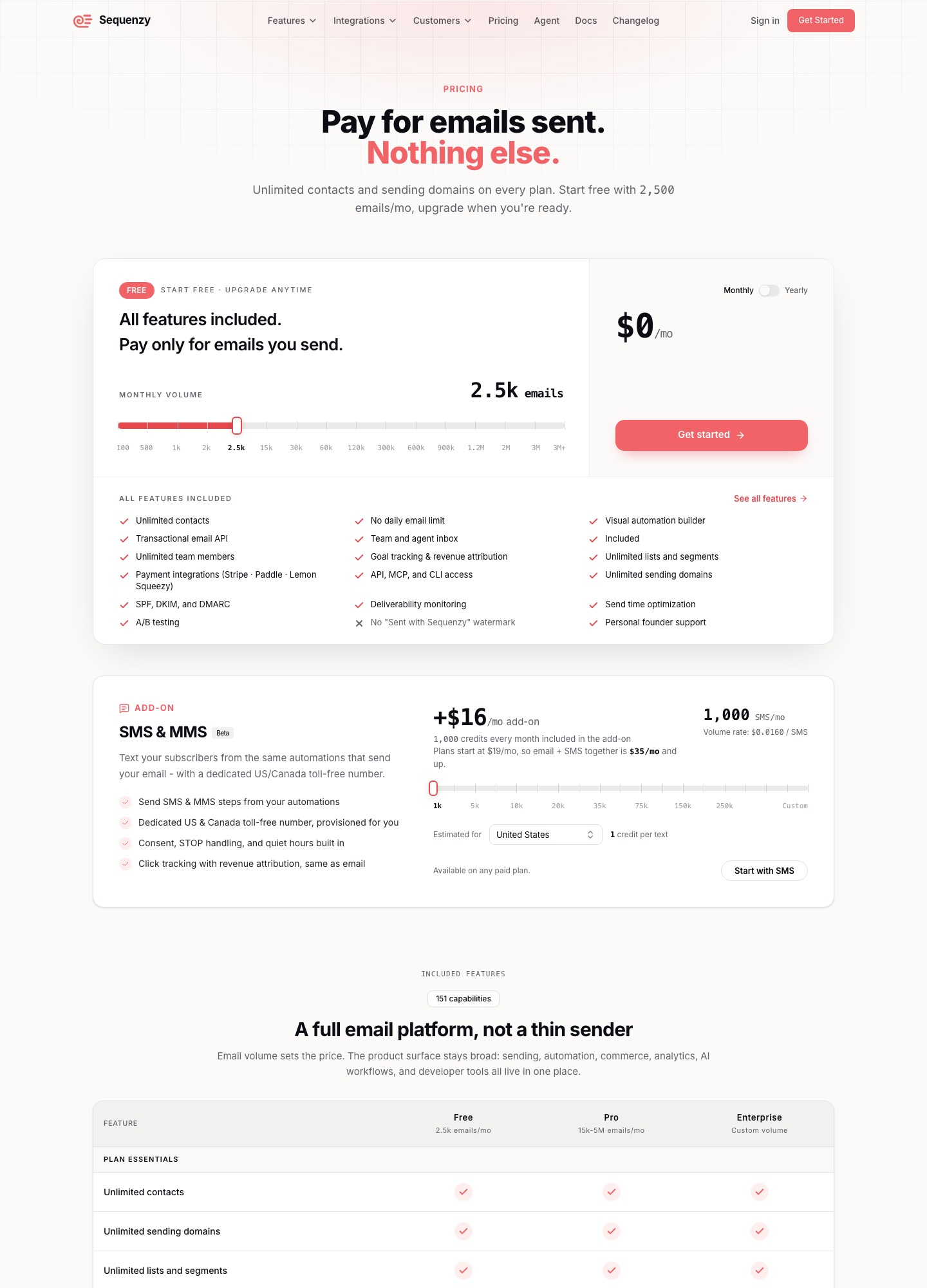
If your customers should be able to design emails inside your product, you are shopping for an embeddable editor, and Unlayer is one of the established ones, from a free tier up to $2,000 a month. If you need to send billing-triggered and lifecycle email to the users of your own SaaS, you are shopping for a sender, such as Sequenzy, from a free 2,500-email plan to $99 for 120,000 emails. No winner here: a company building a marketing product can reasonably need both.
The two products in one table
| Question | Unlayer | Sequenzy |
|---|---|---|
| Who uses it | Your end users, inside your app | Your own team, to mail your users |
| Free plan | $0, forever; email, page, popup and document builders | $0 for 2,500 emails a month (watermark on free sends) |
| Paid prices | Launch $250; Scale $750; Optimize $2,000 a month; Enterprise custom | $19 for 15,000 emails; $29 for 30,000; $49 for 60,000; $99 for 120,000 |
| Billing unit | Plan tier with 1 TB bandwidth included; add-ons in $50 packs | Emails sent; unlimited contacts and domains |
| Sends mail | No; exports HTML, image, PDF or ZIP | Yes, with automations and a transactional API |
| Enterprise terms | Custom contract, SOC 2 Type II, on-premise, white-label | Enterprise plan for custom volume |
Sources: unlayer.com/pricing and sequenzy.com/pricing, read on October 7, 2026.
How Unlayer's tiers are built
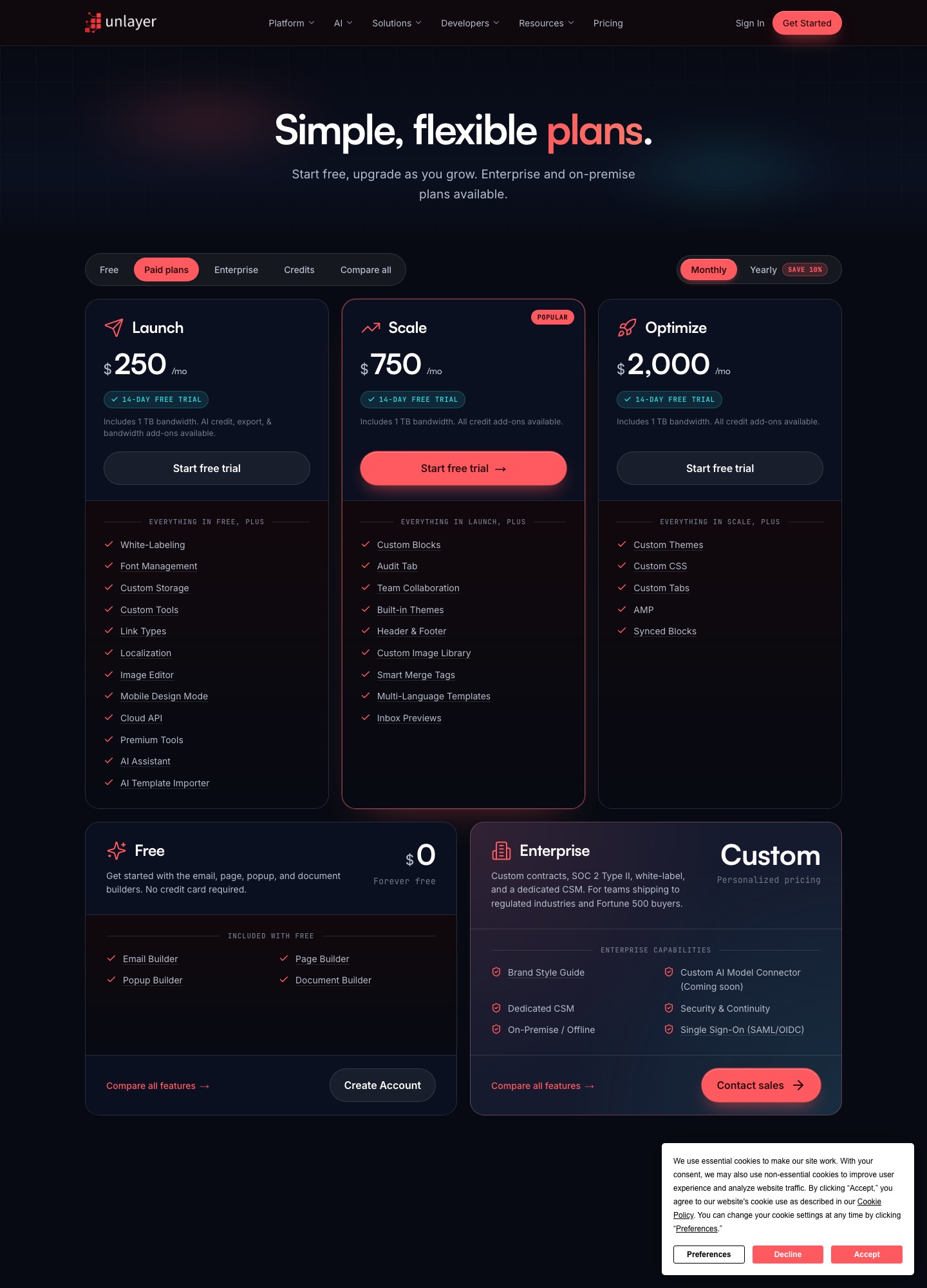
Unlayer sells capability tiers, not seats or sends. According to its pricing page, Free includes the four builders. Launch, at $250 a month, adds white-labeling, font management, custom storage, custom tools, localization, an image editor, a mobile design mode, a cloud API and an AI assistant. Scale, at $750, adds custom blocks, an audit tab, team collaboration, built-in themes, smart merge tags, multi-language templates and inbox previews. Optimize, at $2,000, adds custom themes, custom CSS, custom tabs, AMP and synced blocks. Every paid plan includes 1 TB of bandwidth and a 14-day free trial.
The part that surprises buyers is the credit add-ons. Unlayer's page sells recurring packs in multiples of $50 a month: 50,000 AI credits, 500 export credits for HTML, image, PDF or ZIP, 200 client previews across 90-plus email clients (on Scale, Optimize and Enterprise only), and 500 GB of extra bandwidth. If your product exports a lot of designs or previews, model those lines rather than the headline plan price.
What an embedded editor does and does not solve
An embedded editor solves the design surface: your users get a polished drag-and-drop canvas without your team writing one. It leaves the rest to you. Storing designs, rendering merge tags per recipient, managing lists and consent, sending, tracking bounces and unsubscribes are all outside the editor, which is why the pricing page talks about exports and a cloud API but not deliverability. A company that adopts an editor SDK is usually also choosing a sending provider, and that provider needs to support one customer per sending domain if your users send under their own brand.
That is a reason to be careful about stretching a SaaS-lifecycle sender into this role. Sequenzy's own pages describe unlimited sending domains and a transactional endpoint that accepts HTML you supply, which is a point worth testing, but they are written for a company mailing its own users. Whether it suits a multi-tenant product that sends on behalf of customers is not something those pages claim.
Where Sequenzy fits
Sequenzy is aimed at the lifecycle side of a software company: Stripe, Paddle and Lemon Squeezy connections, segments built from plan and revenue data, an automation canvas, AI-drafted sequences, and an API with an MCP server and a CLI. Its homepage says Stripe's invoice.payment_failed event starts a dunning email flow with a card-update page. The retry schedule stays in Stripe or Paddle, and no recovery percentage is published, so none is claimed here. It carries its own block editor on every plan, so a team that only needs its own emails to look right does not need a second tool.
Three build-or-buy situations
- You are building a CRM or newsletter tool. Your users must design emails inside your product. Evaluate an embedded editor (Unlayer or another SDK), budget for the credit add-ons, and separately decide how mail is delivered.
- You run a subscription app and want onboarding and dunning emails. You are the sender, not the product vendor. Pick a sender on its pricing and event support; Sequenzy, Loops, Customer.io and Resend plus your own code are the realistic field, covered on Loops vs Resend and Customer.io vs Loops.
- You are both. Many B2B tools mail their own customers and let those customers mail theirs. Run an editor SDK for the customer-facing builder and a sender for your own lifecycle mail, and keep the two billing lines separate in your plan.
What combined costs look like
Suppose a small product team embeds Unlayer on the Launch plan ($250 a month) and also sends 20,000 of its own lifecycle emails a month through Sequenzy's 30,000-email step ($29). That is $279 a month, $3,348 a year ($250 + $29 = $279; 12 x $279). The sender is about a tenth of the spend; the editor license dominates. If the editor is not needed, the same team's email costs fall to $29.
If the design surface is the only gap and you want to avoid an enterprise-style license, the builder side of the market has cheaper tools, though most are meant for people, not for embedding. Unlayer vs Chamaileon compares Unlayer with a team-governance builder, and the HTML email builder guide lists what to inspect in an editor's output. On the sender side, Resend lists a Free plan with 3,000 emails and Pro at $20 for 50,000, and Postmark lists Basic at $15 for 10,000, which is the sort of money a delivery layer behind an editor usually costs.
Pick Unlayer if…
- Your product's customers need to design or edit emails themselves, and you want white-labeling.
- You can budget for a license that starts at $250 a month and grows with add-on packs.
- You already have, or will pick, a delivery service that handles per-customer domains.
Pick a sender like Sequenzy if…
- You are mailing your own users, triggered by billing or in-app events, and nobody outside your team designs the emails.
- You prefer to pay by email volume, with unlimited contacts, rather than by capability tier.
- One account for marketing and transactional mail is more useful to you than a design SDK.
FAQ
Does Unlayer send email?
Not on the pages read. Unlayer's pricing page describes email, page, popup and document builders, plus exports to HTML, image, PDF or ZIP, and says nothing about delivering mail to a list. You embed the editor in your product, collect the HTML it produces and pass it to a sender of your choice. Sequenzy, Resend, Postmark and Amazon SES are examples of what sits on the other side of that hand-off.
Is the Unlayer free plan enough to build a prototype?
Unlayer's page lists a Free plan at $0, forever, with the email, page, popup and document builders and no credit card required. White-labeling and several brand and storage features start on the $250 Launch plan, so a customer-facing product usually outgrows Free. For a prototype where only your team sees the editor, Free is a reasonable place to try the builder before a paid trial of 14 days.
Can one company use both Unlayer and Sequenzy?
Yes, and they would not overlap. Sequenzy would carry your own lifecycle email: welcome series, Stripe or Paddle billing events, failed-payment dunning with a card-update page. Unlayer would sit inside the product so that your customers can design their own emails. Sequenzy's pages are written for a company mailing its own users, so check how sending on behalf of your customers' domains would work before you assume it covers that case.
What does Unlayer cost per year?
On monthly billing the three paid plans cost $3,000 (Launch, 12 x $250), $9,000 (Scale, 12 x $750) and $24,000 (Optimize, 12 x $2,000) a year. Unlayer's FAQ says paying annually saves 10 percent on those three plans, which would bring Launch to $2,700. Credit add-ons for AI, exports, client previews and bandwidth are sold in $50-a-month packs on top.