MJML vs React Email: which one should you build emails with?
By Mara Levin · Updated October 7, 2026 · Prices and docs checked that day
Both are free, both compile to table-based HTML, and both are production tools. The difference is what you write, who can edit it and what your backend looks like.
The short answer
Pick React Email if your product is already React and TypeScript: templates become typed components with props, and the dev server gives you a live preview. Pick MJML if your backend is anything else, if several languages need to render the same templates, or if you want a small markup vocabulary that people outside the JavaScript world can read. Neither charges a licence fee, so the real cost is the build step and whatever you use to send.
At a glance
| Question | MJML | React Email |
|---|---|---|
| What you write | XML-like tags such as mj-section, mj-column, mj-text | React components in TSX or JSX |
| Install | npm install mjml | npm install react-email react react-dom |
| Produce HTML | CLI mjml input.mjml -o output.html or mjml2html in Node | render returns an HTML string; toPlainText returns the text part |
| Dev loop | Watch mode (mjml -w), VS Code plugin, online editor | Local dev server (email dev) with live preview |
| Dynamic data | None built in; run a templating step after compiling | Props and ordinary JavaScript |
| Backend language | Any, through ports and bindings | Node, with a React build step |
| Licence | MIT, per the MJML FAQ | MIT, per the GitHub repository |
| Maker | Mailjet | Resend |
The same welcome email, written both ways
A fair comparison needs the same job. Here is one welcome email: preview text, a heading with the person's first name, a short paragraph, a button and an unsubscribe footer. The MJML version follows the structure in the MJML documentation; the React Email version uses the component imports shown in the React Email setup guide.
MJML
<mjml>
  <mj-head>
    <mj-title>Welcome to Acme</mj-title>
    <mj-preview>Your workspace is ready</mj-preview>
    <mj-attributes>
      <mj-all font-family="Helvetica, Arial, sans-serif" />
      <mj-button background-color="#0b5fff" color="#ffffff" border-radius="6px" />
    </mj-attributes>
  </mj-head>
  <mj-body background-color="#f4f4f5">
    <mj-section background-color="#ffffff" padding="32px">
      <mj-column>
        <mj-text font-size="22px" font-weight="bold">Welcome, {{first_name}}</mj-text>
        <mj-text>Your workspace is ready. Invite your team whenever you like.</mj-text>
        <mj-button href="https://app.example.com/start">Open workspace</mj-button>
      </mj-column>
    </mj-section>
    <mj-section>
      <mj-column>
        <mj-text font-size="12px" color="#6b7280" align="center">
          You received this because you signed up at example.com.
          <a href="{{unsubscribe_url}}">Unsubscribe</a>
        </mj-text>
      </mj-column>
    </mj-section>
  </mj-body>
</mjml>
Compile it from the command line with mjml welcome.mjml -o welcome.html, or from Node, where the documented call is asynchronous:
import mjml2html from 'mjml';

const { html, errors } = await mjml2html(source, { validationLevel: 'strict' });
if (errors.length) throw new Error(errors.map((e) => e.message).join('\n'));
// html still contains {{first_name}} and {{unsubscribe_url}}
Two details come straight from the docs. validationLevel accepts strict, soft or skip and defaults to soft, so a typo in a tag name will not stop the build unless you ask it to. And {{first_name}} is only a placeholder: the documentation recommends running your templating engine after MJML rendering, because template tags that look like HTML can be altered when MJML parses the document.
React Email
import {
  Html, Head, Body, Preview, Container, Heading, Text, Button, Link,
} from "react-email";

type WelcomeProps = { firstName: string; unsubscribeUrl: string };

export default function Welcome({ firstName, unsubscribeUrl }: WelcomeProps) {
  return (
    <Html lang="en">
      <Head />
      <Preview>Your workspace is ready</Preview>
      <Body style={{ backgroundColor: "#f4f4f5", fontFamily: "Helvetica, Arial, sans-serif" }}>
        <Container style={{ backgroundColor: "#ffffff", padding: "32px" }}>
          <Heading as="h1" style={{ fontSize: "22px" }}>Welcome, {firstName}</Heading>
          <Text>Your workspace is ready. Invite your team whenever you like.</Text>
          <Button
            href="https://app.example.com/start"
            style={{ background: "#0b5fff", color: "#fff", padding: "12px 20px", borderRadius: "6px" }}
          >
            Open workspace
          </Button>
          <Text style={{ fontSize: "12px", color: "#6b7280", textAlign: "center" }}>
            You received this because you signed up at example.com.{" "}
            <Link href={unsubscribeUrl}>Unsubscribe</Link>
          </Text>
        </Container>
      </Body>
    </Html>
  );
}
To get HTML and a plain-text part out of it, the render documentation shows:
import { render, toPlainText } from "react-email";
import Welcome from "./emails/welcome";

const html = await render(<Welcome firstName="Lucía" unsubscribeUrl="https://example.com/u/123" />);
const text = toPlainText(html);
What the two samples tell you
The MJML file is shorter and has almost no logic to read around: tags describe layout, and defaults (font, button colour) live once in mj-attributes. The React Email file is longer, but the data enters as a typed prop, a wrong prop name fails at compile time, and any piece can become a shared component. If your welcome email has a pricing table driven by an array, a conditional block for trial users and a localised greeting, the React version stays readable while the MJML version needs a second templating language to do the same.
Developer experience
React Email ships a dev server: add "email:dev": "email dev" to your scripts, run it, and the setup guide has you open localhost:3000 and edit email.tsx to see changes live. There is also a Tailwind component. It uses Tailwind 4.1.12 at the time of writing, and its docs tell you to wrap it with pixelBasedPreset because some email clients do not support rem units.
MJML gives you mjml -w to rebuild on change, plugins for Visual Studio Code and Sublime Text, and a free online editor. Its CLI also exposes --config.minify and --config.beautify. One security default is worth knowing: mj-include is ignored unless you turn includes on, so shared headers and footers silently disappear until you pass --config.allowIncludes true (or ignoreIncludes: false in Node).
The practical difference is feedback speed versus reach. React Email gives the faster loop inside a React project. MJML's loop is a compile step that any CI system or non-JavaScript developer can run.
Components and layout
MJML's standard body components include mj-section, mj-column, mj-group, mj-text, mj-image, mj-button, mj-hero, mj-social, mj-navbar, mj-accordion, mj-carousel, mj-spacer and mj-raw for hand-written HTML. The layout rule is strict: columns must sit inside a section, and per the docs they stack on mobile; wrap columns in mj-group if you want them to stay side by side. A few components are interactive and degrade by client; for example the navbar's hamburger menu only works in Apple Mail, and other clients show the links inline.
React Email's components are Html, Head, Body, Container, Section, Row, Column, Heading, Text, Button, Link, Image, Hr, Font, Preview, Markdown, CodeBlock, CodeInline and Tailwind. They are thinner than MJML's: there is no carousel, accordion or hero, because in React you compose those yourself. The Section docs show Row and Column for side-by-side layout but make no promise that columns stack on narrow screens, so test that case or add your own media query.
Rendering and client support
Neither tool can promise identical output everywhere, and both say so by testing against clients rather than guaranteeing them. React Email states that all its components were tested in Gmail, Apple Mail, Outlook, Yahoo! Mail, HEY and Superhuman, and its documented render output for a button includes mso conditional comments for Outlook padding. MJML states that its components are responsive on the most popular clients, even Outlook, and its docs carry an explicit warning that mj-button will not be fully clickable because of limited client support, so click the corners of your button in your own tests.
What decides the outcome is usually your own template, not the framework: images without dimensions, web fonts that fall back, dark-mode colour inversion. Before you pick on this axis, send your actual welcome email through a client preview service and compare the results. Our guides to client compatibility, CSS in email and dark mode cover what to look for.
Ecosystem and what it costs to send
MJML has the longer history and the wider spread. Its documentation lists ports and bindings for Rust (MRML), .NET, Elixir, Ruby, Python, Django and Laravel, plus the mjml-react wrapper, and community components such as mj-qr-code, mj-chart and mjml-msobutton (a button that uses VML for rounded corners in desktop Outlook). Mailjet's own drag-and-drop editor is built on MJML, so templates created visually there share the same structure as hand-coded ones.
React Email's documented integrations cover Resend, Nodemailer, SendGrid, Postmark, Mailgun, AWS SES, Brevo, MailerSend and several smaller senders. Its Resend integration can upload a template so non-developers edit it in Resend's visual editor.
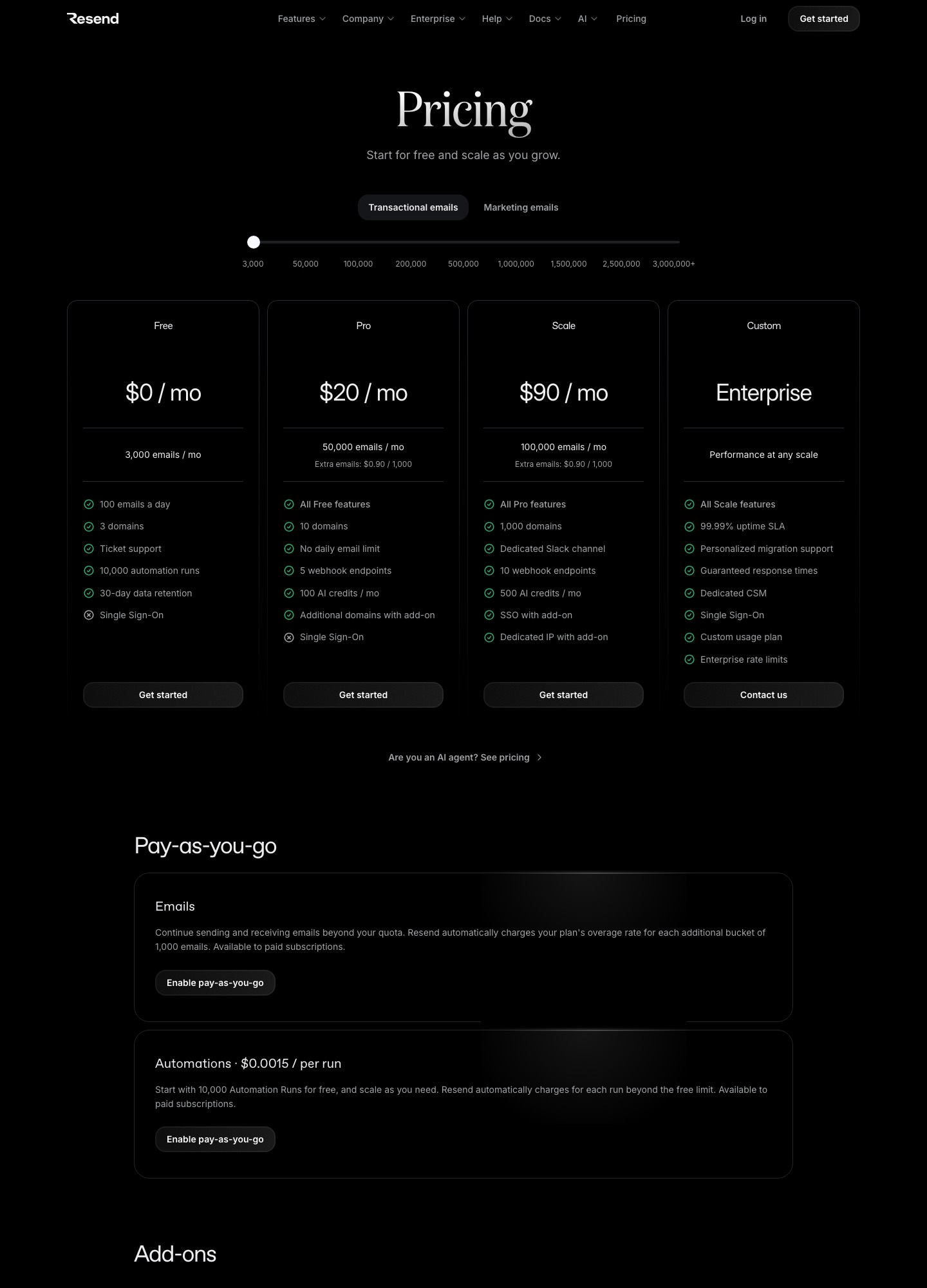
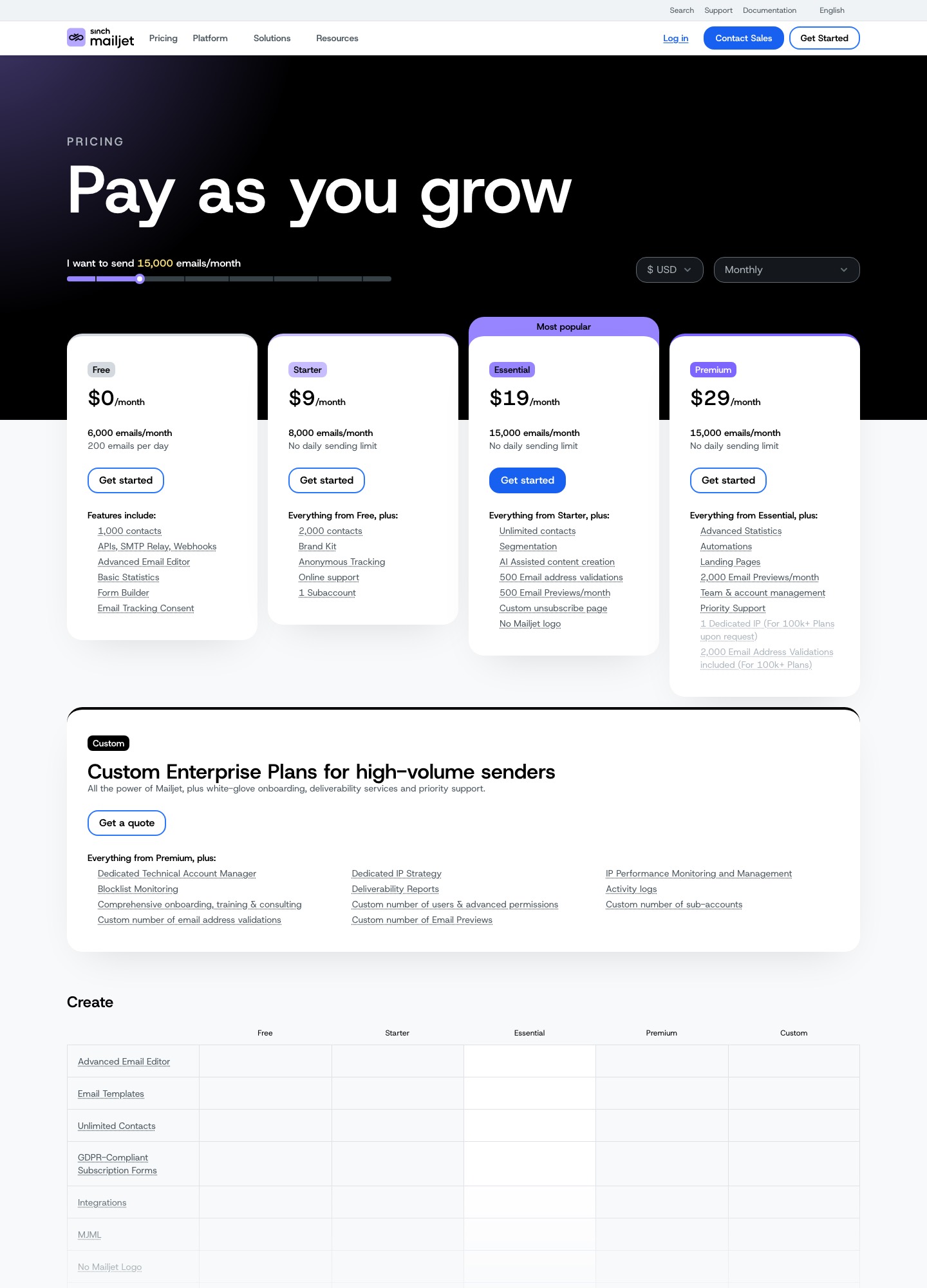
Because both makers run sending businesses, people often assume you must pair MJML with Mailjet and React Email with Resend. You do not, but the numbers are useful context for budgeting. On Resend's pricing page the Free plan is $0 for 3,000 emails a month (100 a day), Pro is $20 for 50,000 and Scale is $90 for 100,000, with extra emails at $0.90 per 1,000. On Mailjet's pricing page Free is $0 for 6,000 emails a month (200 a day), Starter is $9 for 8,000 and Essential is $19 for 15,000. The same page lists 500 email previews a month on Essential and 2,000 on Premium ($29), which covers some of the client-preview testing that otherwise needs a separate tool. Compare the two on your own monthly volume, with the daily cap in mind, before you choose a sender. If you are weighing senders as well as templating, see API-first email services and Resend vs Postmark.
When to choose which
Choose React Email when
- Your application is already React or Next.js and you want email data to share types with the app.
- Templates have real logic: conditional blocks, lists, localisation, shared brand components.
- Developers own the templates and a live preview loop matters more than reach.
Choose MJML when
- Your backend is Rails, Django, Laravel, .NET, Go or Elixir and you do not want a Node and React toolchain just for email.
- Several teams or services must render from the same compiled templates.
- You want a small, declarative vocabulary and ready-made components such as accordions, carousels and hero sections.
Consider something else when
You prefer Tailwind and Vue: see Maizzle vs MJML and React Email vs Maizzle. If marketers need a visual editor, none of these is the tool; the HTML email builder guide covers editors such as Stripo and Beefree.
Migrating between them
There is no converter worth trusting, and the layouts are different enough that a rewrite is faster than a translation. A safe path is to keep the old templates live, rebuild one low-risk email (a password reset, say) in the new tool, send both through the same client previews and compare the screenshots side by side. Only then move the rest, starting with the emails with the simplest layouts.
FAQ
Is React Email just a React wrapper around MJML?
No. They are independent projects with different output pipelines. MJML is a markup language compiled by its own engine, and its documentation lists a community port called mjml-react that wraps MJML tags as React components. React Email is a separate set of components that render themselves to HTML through its render utility, with no MJML compiler involved.
Which one has better Outlook support?
Both aim at it and neither guarantees it. React Email says its components were tested in Gmail, Apple Mail, Outlook, Yahoo! Mail, HEY and Superhuman, and its rendered button includes Outlook-specific conditional comments. MJML says its components are responsive on the most popular clients, even Outlook, and it warns that mj-button is not fully clickable in some clients. Run your own template through a rendering test before you trust either claim.
Can I use MJML if my backend is not JavaScript?
Yes, and this is where MJML is strongest. Its documentation lists ports and bindings for Rust (MRML), .NET, Elixir, Ruby, Python and Laravel. You can also compile once in CI with the Node CLI and ship the HTML as a static asset your backend fills in. React Email assumes a Node and React build step wherever the templates are rendered.
How do I get dynamic content into an MJML template?
MJML has no variables of its own. You write placeholders, compile, and run a templating step on the resulting HTML. The MJML documentation specifically recommends running the templating engine after MJML rendering, because template tags that look like HTML can be altered while MJML parses the document. React Email avoids the problem: props are ordinary React props and the values are in place before render.
Do I need Resend to use React Email?
No. React Email is made by Resend and has a documented Resend integration, but it also documents integrations with Nodemailer, SendGrid, Postmark, Mailgun, AWS SES, Brevo and others. The render utility returns an HTML string, which any sender can accept.